
Mazda CX-5 Service & Repair Manual: Evaporator Temperature Sensor Inspection [Manual Air Conditioner]
NOTE:
-
Inspect the evaporator temperature sensor when it is installed to the A/C unit.
1. Set the fan speed at MAX HI.
2. Set the temperature control at MAX COLD.
3. Set the RECIRCULATE mode.
4. Turn the A/C switch off.
5. Close all doors and windows.
6. Wait for 5 min
.
7. Disconnect the evaporator temperature sensor connector.
8. Measure the temperature at the blower inlet.
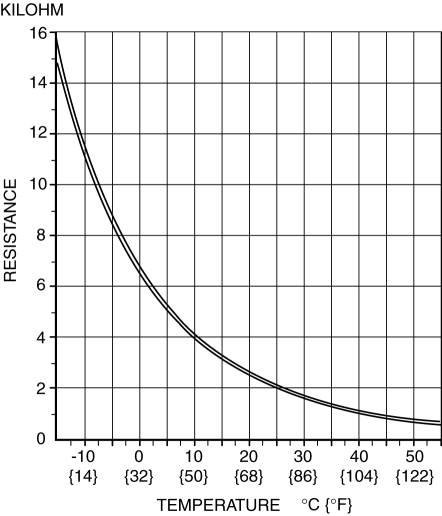
9. Measure the resistance between the evaporator temperature sensor terminals.
-
If the resistance is not as shown in the graph, replace the evaporator temperature sensor.
 Evaporator Temperature Sensor Inspection [Full Auto Air Conditioner]
NOTE:
Inspect the evaporator temperature sensor when it is installed to the A/C
unit.
1. Set the fan speed at MAX HI.
2. Set the temperature control at MAX COLD.
3. Set the RECIRC ...
 Evaporator Temperature Sensor [Full Auto Air Conditioner]
Purpose
The evaporator temperature sensor detects the airflow temperature passing
through the evaporator.
Function
The evaporator temperature sensor converts the detected temper ...
Other materials:
Discharge Headlight System Inspection
WARNING:
Incorrect servicing of the discharge headlights could result in electrical
shock. Before servicing the discharge headlights, always refer to the service
warnings..
Terminal layout
Inspection procedure
Step
Inspection
Actio ...
Shroud Panel Removal/Installation
CAUTION:
Since the servicing is performed with the hood open, secure the hood using
a piece of wood to prevent it from falling.
1. Disconnect the negative battery cable..
2. Remove the following parts:
a. Seal board upper.
b. Front bumper.
c. Front combination light.
d. Sh ...
Climate Control Unit [Manual Air Conditioner]
Purpose
The climate control unit performs air conditioning according to the operation
by the users and the driving conditions of the vehicle.
Function
The climate control unit determines optimum air-conditioning based on the
input signals from each sensor and the control mo ...
