
Mazda CX-5 Service & Repair Manual: Tire Pressure Monitoring System Set Switch Inspection
1. Remove the TPMS set switch..
2. Verify that the resistance between the TPMS set switch terminals B and C is as indicated in the table.
-
If not as indicated in the table, replace the TPMS set switch.
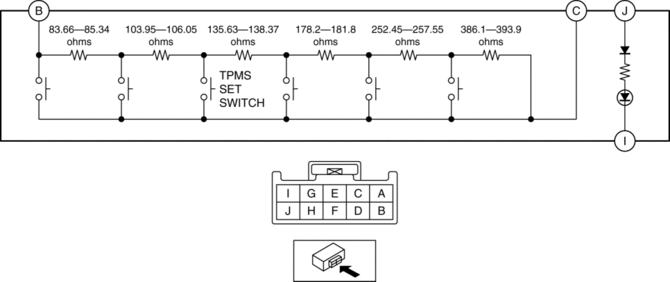
TPMS set switch specification
|
Terminal |
Test condition |
Resistance (ohms) |
|
B—C |
Switch pressed |
187.61—191.39 |
|
Switch released |
1139.99—1163.01 |
3. Apply battery voltage to TPMS set switch terminal J, and connect terminal I to ground.
4. Verify that the LED illuminates.
-
If there is any malfunction, replace the TPMS set switch.
 Tire Pressure Monitoring System Set Switch
Purpose
The tire pressure monitoring system set switch is used to initialize the
tire pressure monitoring system.
Construction, Operation
The tire pressure monitoring syst ...
 Tire Pressure Monitoring System Set Switch Removal/Installation
NOTE:
The tire pressure monitoring system (TPMS) set switch is integrated with
the cluster switch.
Refer to SWITCH PANEL REMOVAL/INSTALLATION to remove the cluster switch.
...
Other materials:
Generator Control [Skyactiv G 2.0]
Outline
Idling stability has been improved by optimum control of generator voltage
according to engine operation and electrical load conditions.
The PCM determines the engine operation and electrical load conditions based
on the input signals from each control part and controls ...
Electric Power Steering System
Outline
A column assist type EPS has been adopted for all models.
EPS provides smooth handling from low to high speeds as a result of the excellent
steering feel provided by the electronic control and the vehicle-speed responsive
control.
EPS does not require a power ste ...
Front Over Fender Removal/Installation
1. Remove fastener A.
2. Pull the front over fender lower in the direction of the arrow (1) while removing
hook B and pin C.
3. Remove fasteners D.
4. Pull the front over fender upper in the direction of the arrow (2) while removing
clips E.
5. Install in the reverse order of ...
