
Mazda CX-5 Service & Repair Manual: Driver Side Air Bag Module [Standard Deployment Control System]
Purpose
-
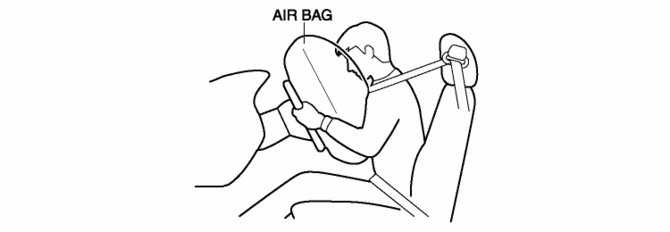
When the driver-side air bag module receives an impact from a frontal or frontal offset collision, the operation (deployment) of the air bag mediates the impact to the head and face of the driver.
Function
-
When the driver-side air bag module receives an impact from a frontal or frontal offset collision, the air bag is operated (deployed) by the operation signal sent from the SAS control module.
Construction
-
The driver-side air bag module is installed to the center area of the steering wheel.
Operation
Inflator operation
-
The driver-side air bag module operates (deploys) the air bag by activating the internal inflator.
-
The inflator operates (deploys) in the following order:
1. When an operation (deployment) signal is received from the SAS control module, the igniter built into the inflator generates heat and ignites the ignition agent.
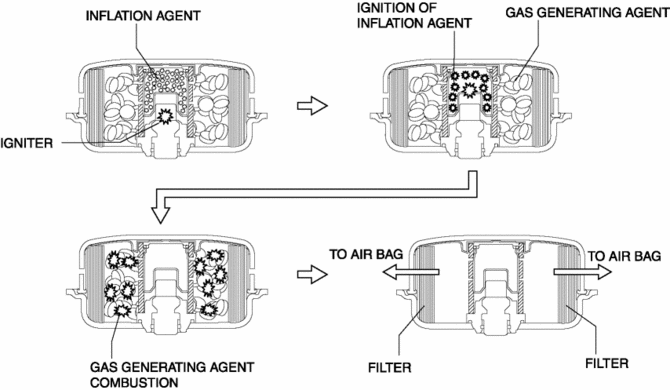
2. The ignition of the ignition agent causes the combustion of a gas generating agent which forms nitrogen gas.
3. The nitrogen gas is cooled at the filter and the filtrate is injected into the air bag.
Fail-safe
-
Function not equipped.
 Driver Side Air Bag Module Removal/Installation [Standard Deployment Control
System]
Driver Side Air Bag Module Removal/Installation [Standard Deployment Control
System]
WARNING:
Handling the air bag module improperly can accidentally deploy the air bag
module, which may seriously injure you. Read the air bag system service warnings
and cautions before h ...
 Electric Variable Valve Timing Control
Outline
The PCM determines the optimum intake valve timing according to the engine
operation conditions, and sends the motor drive signals to the electric variable
valve timing driver. Wi ...
Other materials:
Sunroof Switch Inspection
1. Disconnect the negative battery cable..
2. Remove the front map light..
3. Verify that the continuity between the sunroof switch terminals is as indicated
in the table.
If not as indicated in the table, replace the sunroof switch.
...
Bsm Indicator Light Flashes While Not Under Bsm Indicator Light Flashing Conditions
(No Combination Switch Operation (Turn Signal Switch)) [Blind Spot Monitoring (Bsm)]
Description
BSM indicator light flashes while not under BSM indicator light-flashing
conditions (no combination switch operation (turn signal switch)
The BSM indicator light flashes despite not satisfying the BSM indicator
light flashing ...
DSC HU/CM Removal/Installation
WARNING:
If the DSC HU/CM configuration is not completed, it could result in an unexpected
accident due to the DSC being inoperative. If the DSC HU/CM is replaced, always
use the automatic configuration function so that the DSC operation conditions
are correct.
If the DSC re ...
