
Mazda CX-5 Service & Repair Manual: Door Ajar Warning Light
Purpose
-
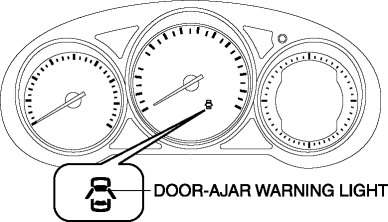
The door-ajar warning light notifies the driver that any door or the liftgate is open.
Function
-
When the instrument cluster receives any of the following signals sent from the rear body control module (RBCM) via the CAN signal, the door-ajar warning light illuminates.
-
Door latch switch ON signal (door open)
-
Liftgate latch switch ON signal (liftgate open)
Construction
-
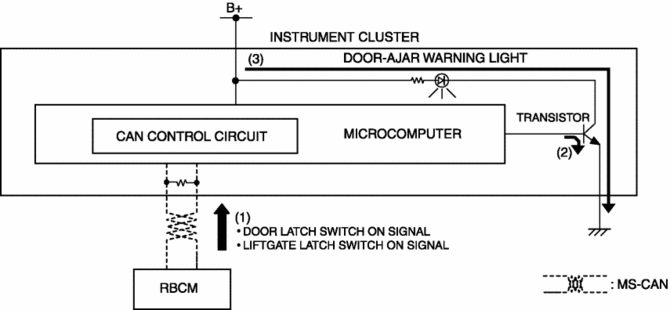
The instrument cluster controls illumination on/off of the door-ajar warning light using the instrument cluster microcomputer based on the door latch or liftgate latch position signal from the rear body control module (RBCM).
-
The door-ajar warning light is set in the instrument cluster.
Operation
1. The instrument cluster receives (1) the door latch switch ON signal or liftgate latch switch ON signal from the rear body control module (RBCM).
2. The instrument cluster microcomputer turns the transistor on (2) based on each signal.
3. When the transistor turns on, a ground circuit with the door-ajar warning light is established and the door-ajar warning light illuminates (3).
Fail-safe
-
Function not equipped.
 Door Adjustment
1. Measure the gap and height difference between the door and the body.
2. Loosen the door hinge installation bolts and adjust the door.
Standard clearance
a: 2.8?3.8 mm {0.12?0.14 in} ...
 Door Module Panel
Purpose, Function
Styrofoam door module panels have been adopted for reducing vehicle weight.
Construction
Styrofoam is applied to the door module panels (shaded areas) durin ...
Other materials:
Rear ABS Wheel Speed Sensor Inspection [Awd]
Installation Visual Inspection
1. Inspect the following items:
If there is any malfunction, replace the applicable part.
a. Excessive play of the ABS wheel-speed sensor
b. Deformation of the ABS wheel-speed sensor
c. Deformation or damage of the ABS sensor rotor
Clearance Inspec ...
Rear Parking Brake Cable Removal/Installation
1. Remove the front console box..
2. Remove the shift lever knob. (MTX).
3. Remove the shift panel..
4. Remove the upper panel..
5. Remove the rear console..
6. Loosen the adjusting nut.
7. Remove the floor under cover No.2..
8. Remove in the order indicated in the table.
9. Install ...
Front Body Straight Line Dimensions (1) [Dimensions]
Point symbol
Designation
Hole diameter or bolt or nut size mm {in}
A
Cowl panel installation hole
?5 {0.2}
B
Wiper bracket datum hole
?7 {0.3}
C
...
