
Mazda CX-5 Service & Repair Manual: Column Cover Removal/Installation
1. Pull down the steering wheel.
2. Press the shaded area shown in the figure using your thumb, and lift the upper column cover in the direction of arrow (1).
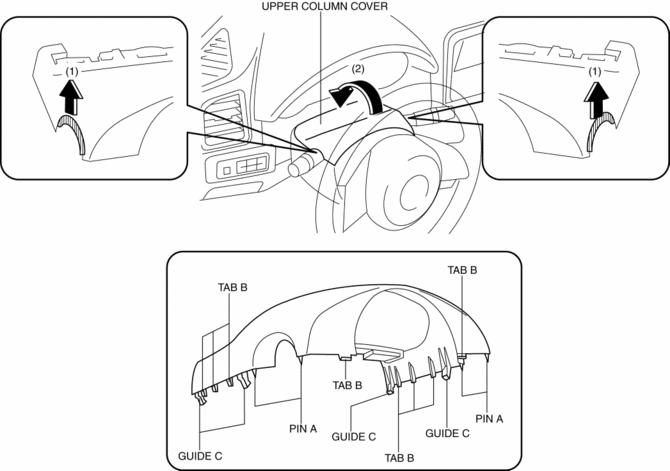
3. Pull the upper column cover in the direction of the arrow (2) and remove it while detaching pins A, tabs B and guides C.
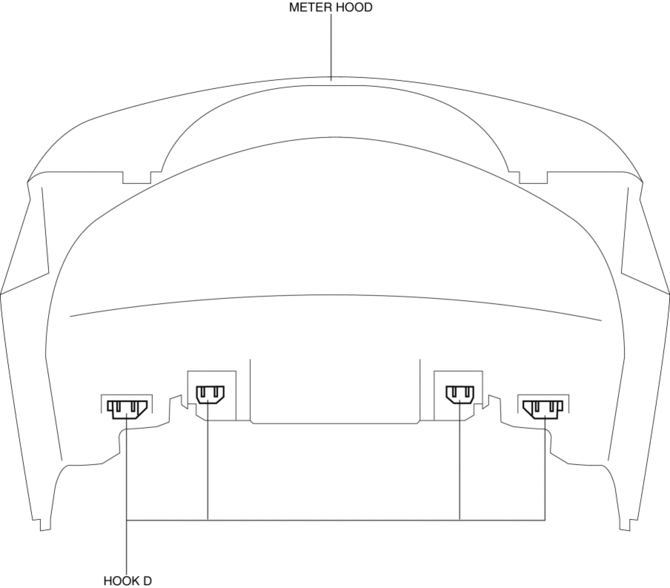
4. Remove hooks D from the meter hood.
CAUTION:
-
If the cover of the meter hood is deformed, it may not return to its original condition. When removing the cover of the meter hood, detach hooks D one by one from the upper column cover.
5. Pull up the steering wheel.
6. Remove screws E.
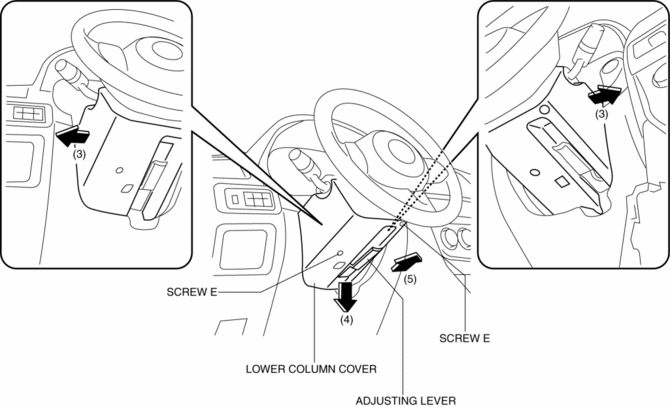
7. Remove the lower column cover in the direction of the arrow (4), (5) set the adjusting lever aside while keeping it open in the direction of the arrow (3) shown in the figure.
8. Install in the reverse order of removal.
 Center Panel Removal/Installation
1. Disconnect the negative battery cable..
2. Remove the decoration panel.
3. Take the shaded area shown in the figure, and pull the center panel in the
direction of the arrow in the order of (1 ...
 D Pillar Trim Removal/Installation
1. Disconnect the negative battery cable..
2. Remove the following parts:
a. Trunk board.
b. Trunk end trim.
c. Rear scuff plate.
d. Trunk side trim.
3. Take the shaded area shown in the f ...
Other materials:
Active Command Modes Inspection [Instrument Cluster]
1. Connect the M-MDS to the DLC-2.
2. After the vehicle is identified, select the following items from the initialization
screen of the M-MDS.
a. Select “DataLogger”.
b. Select “Modules”.
c. Select “IC”.
3. Select the simulation items from the PID table.
4. Perform the acti ...
Suspension
49 T034 1A0
Coil spring compressor set
49 T028 3A0
Ball joint puller set
49 G033 102
Handle
49 U034 204
Dust boot installer
49 FT01 389
Pr ...
Cruise Control System
Outline
Enables driving at a constant speed by setting the vehicle speed with the
cruise control switch instead of operating the accelerator pedal.
The PCM controls the throttle valve actuator to maintain the vehicle at a
constant speed.
Component and function
...
