
Mazda CX-5 Service & Repair Manual: Clutch Pedal Position Switch Removal/Installation [C66 M R]
1. Disconnect the negative battery cable..
2. Disconnect the clutch pedal position switch connector.
3. Rotate the clutch pedal position switch 45° counterclockwise.
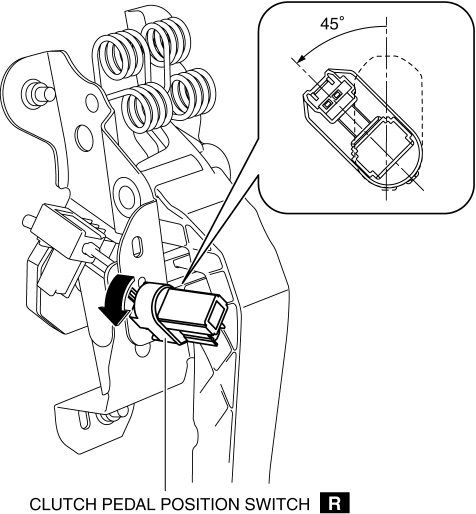
4. Remove the clutch pedal position switch from the clutch pedal.
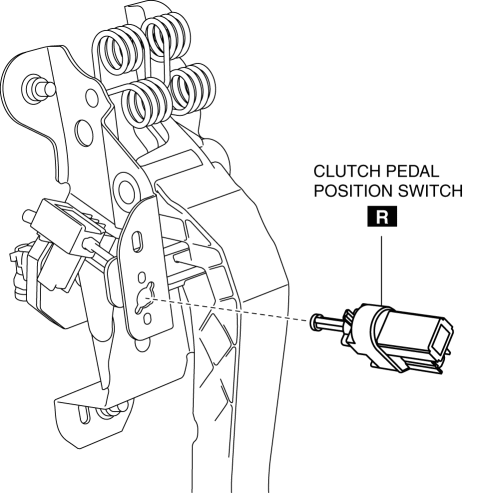
5. Insert a new clutch pedal position switch into the clutch pedal hole until the switch stops.
6. Rotate the clutch pedal position switch 45° clockwise.
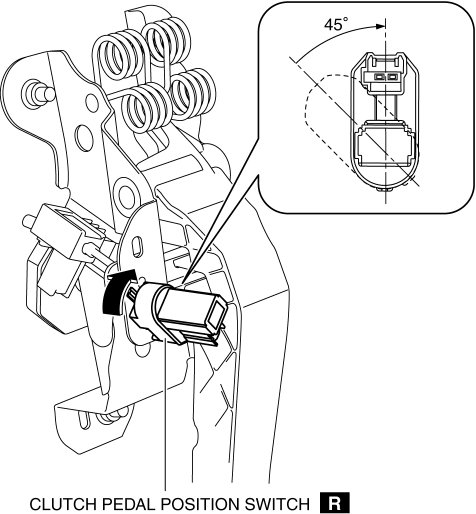
7. Verify that the clutch pedal position switch is locked securely.
8. Install in the reverse order of removal.
 Clutch Pedal Position (CPP) Switch [Skyactiv G 2.0]
Purpose/Function
Detects the connection status of the clutch.
Construction
Installed on the clutch pedal.
An ON/OFF type switch has been adopted.
Operation
...
 Clutch Pedal Removal/Installation [C66 M R]
CAUTION:
Secure the steering wheel using tape or a cable to prevent the steering shaft
from rotating after disconnecting the steering shaft. If the steering wheel
rotates after the steer ...
Other materials:
Throttle Body Inspection
Resistance Inspection
1. Disconnect the negative battery cable..
2. Disconnect the throttle body connector.
3. Measure the resistance between throttle body terminals E and F.
Throttle body resistance
1.38 ohms [20°C {68 °F}]
If not as specified, replace the throttle ...
Drive Belt
Purpose, Function
The drive belt transmits rotation force of the crankshaft pulley to the pulley
for the auxiliary parts.
Construction
The drive belt is installed to the front of the engine.
A V-ribbed belt has been adopted for the drive belt.
The wat ...
Magnetic Clutch Adjustment [Manual Air Conditioner]
1. Measure the clearance around the entire circumference between the pressure
plate and A/C compressor pulley using a thickness gauge.
2. Verify the clearance.
If not within the specification, remove the pressure plate and adjust the
clearance by changing the shim (0.2 mm {0.008 i ...
