
Mazda CX-5 Service & Repair Manual: Clutch Pedal Position (CPP) Switch Inspection [Skyactiv G 2.0]
Continuity Inspection
1. Verify that the CPP switch is installed properly..
2. Disconnect the negative battery cable..
3. Disconnect the CPP switch connector.
4. Verify that the continuity between CPP switch terminals A and B when the clutch pedal is depressed and when it is released is according to the following table:
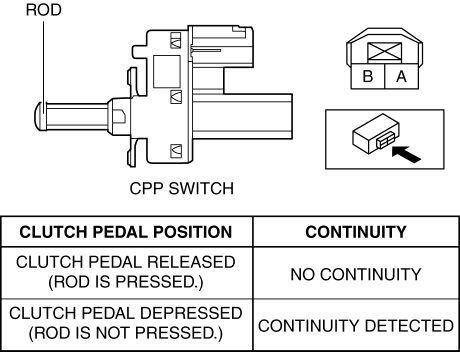
-
If not as verified, replace the CPP switch..
 Clutch Pedal Inspection [C66 M R]
NOTE:
For the clutch pedal inspection, note the following and measure each inspection
location.
Measure the center of the upper surface of the pedal pad for each inspection.
...
 Clutch Pedal Position (CPP) Switch [Skyactiv G 2.0]
Purpose/Function
Detects the connection status of the clutch.
Construction
Installed on the clutch pedal.
An ON/OFF type switch has been adopted.
Operation
...
Other materials:
Propeller Shaft Removal/Installation
CAUTION:
If the constant velocity joint is bent during propeller shaft removal/installation
or transportation after servicing, the constant velocity joint boot may contact
the metallic cover and the boot may be damaged. Insert a rag between the boot
and the metallic cover before ser ...
Bsm Indicator Light Does Not Flash While Under Bsm Indicator Light Flashing
Conditions (With Combination Switch Operation (Turn Signal Switch)) [Blind Spot
Monitoring (Bsm)]
Description
BSM indicator light does not flash while under BSM indicator light-flashing
conditions (with combination switch operation (turn signal switch))
The BSM indicator light does not flash or illuminate continuously,
but the cond ...
Rear Parking Brake Cable Removal/Installation
1. Remove the front console box..
2. Remove the shift lever knob. (MTX).
3. Remove the shift panel..
4. Remove the upper panel..
5. Remove the rear console..
6. Loosen the adjusting nut.
7. Remove the floor under cover No.2..
8. Remove in the order indicated in the table.
9. Install ...
