
Mazda CX-5 Service & Repair Manual: Center Roof Antenna Inspection
NOTE:
-
The center roof antenna is integrated with the antenna amplifier.
Antenna amplifier inspection
1. Disconnect the negative battery cable..
2. Remove the following parts:
a. Front scuff plate.
b. Rear scuff plate.
c. B-pillar lower trim.
d. Front seat belt adjusting cover.
e. Front seat belt upper anchor installation bolt.
f. B-pillar upper trim.
g. Trunk board.
h. Trunk end trim.
i. Trunk side trim.
j. D-pillar trim.
k. C-pillar trim.
3. Remove the rear passenger's assist handle..
4. Partially peel back the headliner.
NOTE:
-
Be careful not to peel back the headliner excessively. Otherwise it could create a fold-seam in the headliner.
5. Connect the negative battery cable..
6. Switch the ignition ON (engine off).
7. Turn the audio unit power on.
8. Tune in the radio.
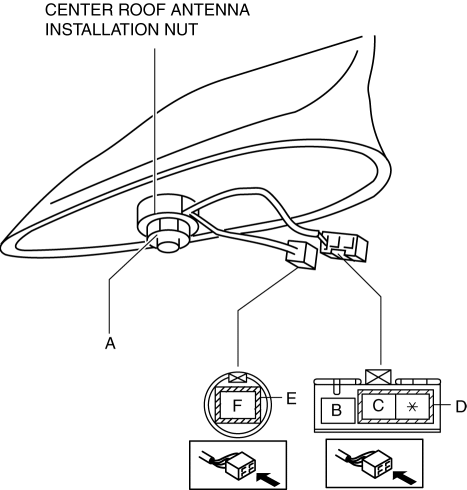
9. Verify that the battery voltage is supplied to antenna amplifier terminal A.
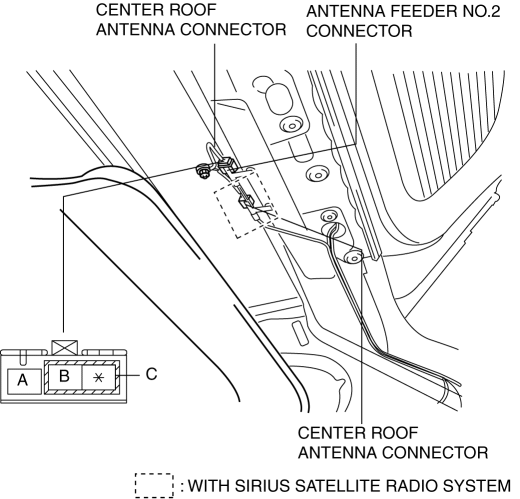
-
If the battery voltage cannot be verified, inspect the audio unit and antenna feeder.
-
If the battery voltage can be verified, go to the feeder line inspection.
Feeder line inspection
1. Disconnect the negative battery cable..
2. Remove the center roof antenna.
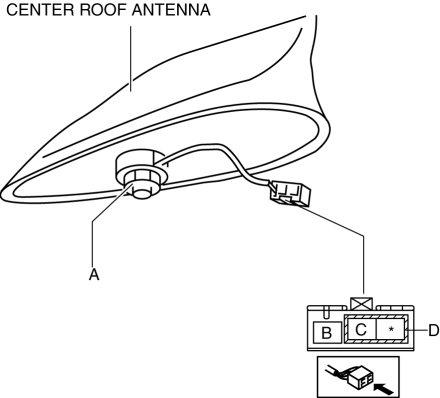
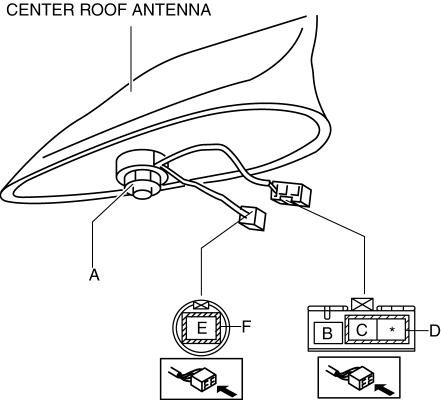
3. Verify that there is no continuity between center roof antenna sections A and B and E (with AM/FM/SIRIUS type only)
AM/FM type
AM/FM/SIRIUS type
-
If there is continuity, replace the center roof antenna.
4. Install the center roof antenna.
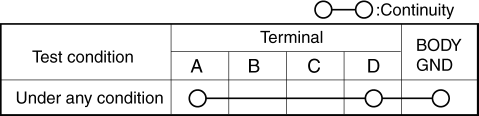
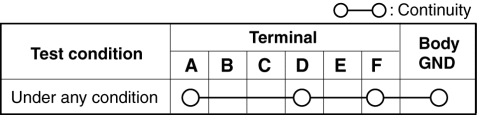
5. Verify that the continuity between the center roof antenna terminals is as indicated in the table.
AM/FM type
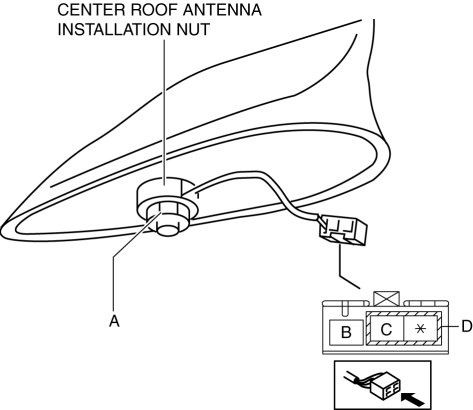
AM/FM/SIRIUS type
-
If the continuity is not as indicated in the table, verify the installation condition of the center roof antenna installation nut.
AM/FM type
AM/FM/SIRIUS type
-
If the installation condition of the center roof antenna installation nut is normal, replace the center roof antenna.
 Center Roof Antenna
Purpose, Function
Converts radio broadcast waves to electric signals and sends the signals
to the audio unit.
Construction
A center roof antenna has been adopted which does not ...
 Center Roof Antenna Removal/Installation
1. Disconnect the negative battery cable..
2. Remove the following parts:
a. Front scuff plate.
b. Rear scuff plate.
c. B-pillar lower trim.
d. Front seat belt adjusting cover.
e. Front se ...
Other materials:
Fuel Pressure Sensor Inspection
Voltage Inspection
NOTE:
The fuel pressure sensor cannot be removed as a single unit. When replacing
the fuel pressure sensor, replace it together with the fuel distributor as a
single unit.
1. Connect the M-MDS to the DLC?2.
2. Switch the ignition ON (engine off or on).
3. ...
Air Fuel Ratio (A/F) Sensor
Purpose/Function
Detects the oxygen concentration (all-range air/fuel ratio) in the exhaust
gas as basic information for mainly determining the fuel injection amount.
Detects the oxygen concentration (all-range air/fuel ratio) in the exhaust
gas and inputs it to the PCM as an ox ...
Fuel Line Pressure Inspection
WARNING:
Fuel line spills and leakage from the pressurized fuel system are dangerous.
Fuel can ignite and cause serious injury or death and damage. To prevent this,
complete the following inspection with the engine stopped.
Fuel is very flammable liquid. If fuel spills or leaks ...
