
Mazda CX-5 Service & Repair Manual: Rear Drive Shaft Inspection
1. Inspect each connecting part for looseness.
-
Tighten or replace parts if necessary.
2. Inspect the dust boot on the drive shaft for cracks, damage, leaking grease, and looseness in the boot band.
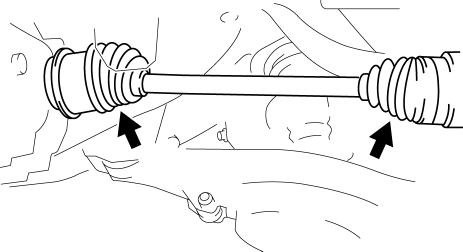
3. Inspect the drive shaft for bends, cracks, and wear in the joints or splines.
-
Repair or replace the drive shaft or boot band if necessary.
 Rear Drive Shaft Disassembly/Assembly
1. Disassemble in the order indicated in the table.
2. Assemble in the reverse order of disassembly.
1
Boot band (differential side)
(See Boot Band (Differential Sid ...
 Rear Drive Shaft Removal/Installation
CAUTION:
Performing the following procedures without first removing the ABS wheel?speed
sensor may possibly cause an open circuit in the harness if it is pulled by
mistake. Before perfor ...
Other materials:
Engine Coolant Temperature (ECT) Sensor Removal/Installation
WARNING:
When the engine is hot, it can badly burn. Turn off the engine and wait until
it is cool before removing the ECT sensor.
ECT Sensor No.1
1. Disconnect the negative battery cable..
2. Remove the plug hole plate..
3. Drain the engine coolant..
4. Pull out the evaporati ...
A Pillar Trim Removal/Installation
1. Partially peel back the seaming welt.
2. Take the shaded area shown in the figure, and pull the A-pillar trim in the
direction of the arrow (1) while detaching clip A, clips B.
3. Cut the lead wire connecting clips B and grommet using a nipper.
4. Pull the A-pillar trim in the dir ...
Replace Electrical Battery
If the buttons on the transmitter are inoperable and the operation indicator
light does not flash, the battery may be dead.
Replace with a new battery before the transmitter becomes unusable.
CAUTION
● Make sure the battery is installed correctly.
Battery leakage could occur if it is no ...
