
Mazda CX-5 Service & Repair Manual: Car Navigation Unit
Purpose
-
Reads the SD card data inserted into the car-navigation unit and sends the read data to the audio unit.
Function
-
The car-navigation unit has the following functions:
TomTom Home
-
By connecting the SD card to your computer at home, the map data or software can be updated by the user.
LIVE Service
NOTE:
-
Can be used when the TomTom Live service is contracted.
-
HD traffic™
-
Safety alerts
-
Local search
-
Weather forecast
Construction
-
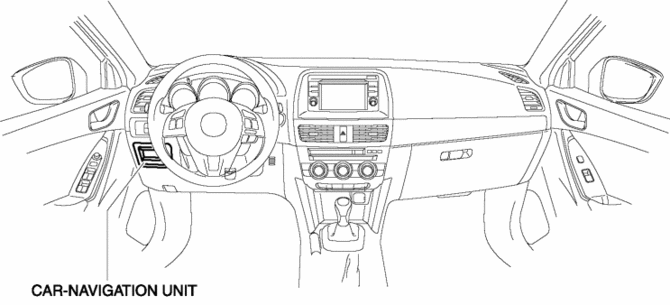
The car-navigation unit is installed to the driver-side lower panel.
-
The panel is integrated with the unit.
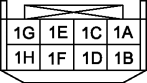
Terminal layout and signal
Antenna feeder connector
|
Terminal |
Signal |
|
|
|
1A |
Ground |
|
1B |
Ground |
|
|
1C |
Ground |
|
|
1D |
Ground |
|
|
1E |
— |
|
|
1F |
— |
|
|
1G |
ACC |
|
|
1H |
+B |
|
|
|
2A |
USB power |
|
2B |
USB data (+) |
|
|
2C |
USB GND |
|
|
2D |
USB data (+) |
|

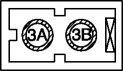
GPS/RDS-TMC antenna
Antenna feeder connector
|
Terminal |
Signal |
|
|
|
3A |
RDS-TMC |
|
3B |
GPS |
|
Operation
-
For the car-navigation unit operation, refer to the CAR-NAVIGATION SYSTEM
Fail-safe
-
Function not equipped.
 Car Navigation System Does Not Start Operation [Car Navigation System]
Possible DTC
Even if the NAVI mode is selected, the car-navigation system screen does
not display.
POSSIBLE CAUSE
NAV switc ...
 Car Navigation Unit Removal/Installation
CAUTION:
The audio unit communicates with the car-navigation unit and records the
presence/non-presence of the car-navigation unit when the ignition is switched
to ACC or ON (engine off ...
Other materials:
Mass Air Flow (MAF) Sensor
Purpose/Function
Detects the intake airflow amount introduced into the cylinder as basic information
for mainly determining the fuel injection amount.
Detects the intake airflow amount introduced into the cylinder and inputs
it to the PCM as an intake airflow amount signal.
...
Purge Solenoid Valve
Purpose, Function
Introduces evaporative gas absorbed by the charcoal canister to the intake
manifold.
The purge solenoid valve opens according to the control signal from the PCM.
Construction
The purge solenoid valve is installed in the engine compartment.
...
Passenger Side Air Bag Module Removal/Installation [Two Step Deployment Control
System]
WARNING:
Handling the air bag module improperly can accidentally deploy the air bag
module, which may seriously injure you. Read the air bag system service warnings
and cautions before handling the air bag module..
Due to the adoption of 2-step deployment control in the passeng ...
