
Mazda CX-5 Service & Repair Manual: Brake Fluid Pressure Sensor Inspection
1. Switch the ignition to off.
2. Remove the clips.
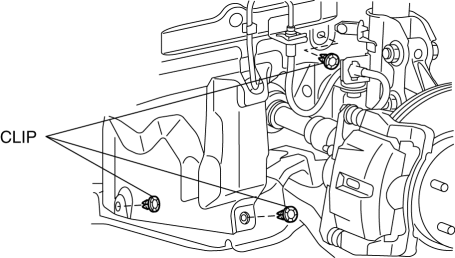
3. Set the splash shield out of the way.
4. Disconnect the brake pipe from the LF brake hose.
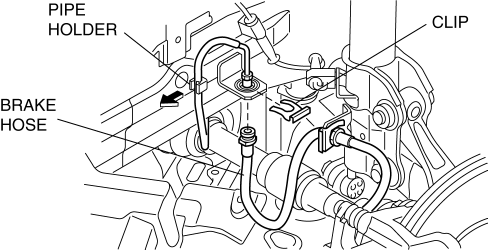
5. Remove the clip.
6. Remove the LF brake hose from the bracket.
7. Detach the brake pipe from the pipe holder.
8. Install the SST
to the brake pipe as shown in the figure.
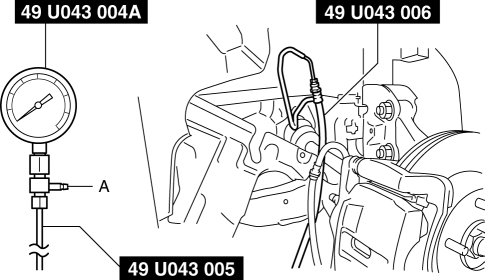
9. Bleed the brake line and the SSTs
of air. Bleed the air form the SSTs
using bleeder screw A.
10. Connect the M-MDS to the DLC-2.
11. Select the “BRK_F_P_R” PID.
12. Start the engine.
13. Depress the brake pedal, and confirm that the fluid pressure value of the SST
(Gauge) and the value shown on the M-MDS are equal
-
If the fluid pressures are different, replace the DSC HU/CM..
14. After the inspection, remove the SSTs
, install the brake hose, clamp, and brake pipe to the original positions, and then bleed the air from the brake line..
 Brake Fluid Pressure Sensor
Purpose/Function
The brake fluid pressure sensor detects the fluid pressure from the master
cylinder and transmits it to the DSC HU/CM.
Construction
The brake fluid pressure sen ...
 Pressure Sensor Removal/Installation [Two Step Deployment Control System]
WARNING:
Handling the pressure sensor improperly can accidentally operate (deploy)
the air bag module, which may seriously injure you. Read the air bag system
service warnings and cautio ...
Other materials:
Power Outer Mirror Inspection
Mirror Glass Adjustment
1. Disconnect the negative battery cable..
2. Remove the following parts:
a. Inner garnish.
b. Front door trim.
c. Power outer mirror.
3. Apply battery positive voltage and connect the ground to the power outer mirror
terminals and inspect the power outer mirror ...
Controller Area Network (Can) Outline
The Electric Power Steering (EPS) control module sends and receives data
to and from other modules via the CAN..
Data sent
EPS status
Power steering malfunction indicator light on request
Steering angle
Data received
Vehicle speed
Engine spe ...
Control Valve Body [Fw6 A EL, Fw6 Ax EL]
Purpose/Function
A direct linear solenoid has been adopted for the solenoid valve which contributes
to improved shift response, drive feel and reduced shift shock by the improved
precision of the hydraulic pressure control.
Construction
The control valve body consists of in ...
