
Mazda CX-5 Service & Repair Manual: B Pillar Upper Trim Removal/Installation
1. Remove the following parts:
a. Front scuff plate.
b. Rear scuff plate.
c. B-pillar lower trim.
d. Adjuster anchor cover.
e. Upper anchor installation bolts on the front seat belt.
2. Partially peel back the seaming welt.
3. Take the shaded area shown in the figure, and pull the B-pillar upper trim in the direction of the arrow (1) while detaching clips A, pin B, pin C.
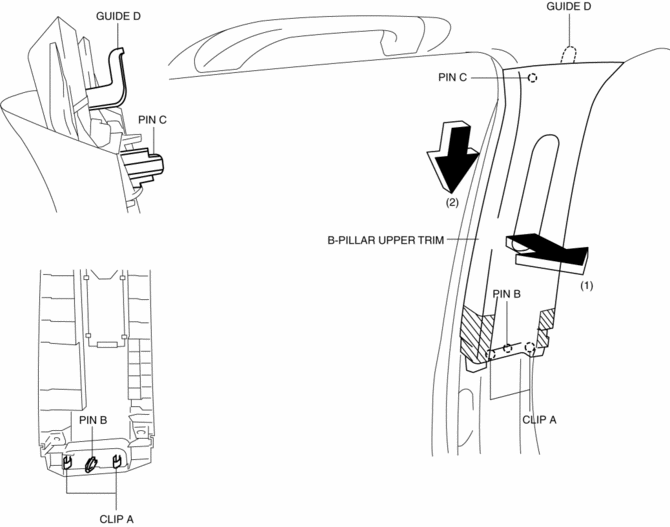
4. Remove the B-pillar upper trim in the direction of the arrow (2) shown in the figure while detaching the guide D.
CAUTION:
-
If clips A, pin B and pin C is removed forcefully, guide D may be damaged. Carefully remove clips A, pin B and pin C so as not to damage guide D.
5. Install in the reverse order of removal.
 B Pillar Lower Trim Removal/Installation
1. Remove the front scuff plate..
2. Remove the rear scuff plate..
3. Partially peel back the seaming welt.
4. Take the shaded area shown in the figure, and pull the B-pillar lower trim
in the ...
 C Pillar Trim Removal/Installation
1. Disconnect the negative battery cable..
2. Remove the following parts:
a. Trunk board.
b. Trunk end trim.
c. Rear scuff plate.
d. Trunk side trim.
e. D-pillar trim.
3. Partially peel ...
Other materials:
Manifold Absolute Pressure (Map) Sensor/Intake Air Temperature (Iat) Sensor
No.2 Removal/Installation
NOTE:
Because the IAT sensor No.2 is integrated in the MAP sensor, replacing the
IAT sensor No.2 includes replacement of the MAP sensor/IAT sensor No.2.
1. Disconnect the negative battery cable..
2. Disconnect the MAP sensor/IAT sensor No.2 connector.
3. Remove the MAP sensor/IA ...
Dashboard Disassembly/Assembly
1. Disassemble in the order indicated in the table.
1
Wiring harness
2
Screw A
3
Screw B
4
Dashboard member
5
Screw C
6
Duct No.1
...
Heated Oxygen Sensor (HO2 S)
Purpose/Function
Detects the oxygen concentration (theoretical air/fuel ratio) in the exhaust
gas as basic information for mainly determining the fuel injection amount and
as information for determining the deterioration of catalytic converter.
Detects the oxygen concentration ( ...
