
Mazda CX-5 Service & Repair Manual: C Pillar Trim Removal/Installation
1. Disconnect the negative battery cable..
2. Remove the following parts:
a. Trunk board.
b. Trunk end trim.
c. Rear scuff plate.
d. Trunk side trim.
e. D-pillar trim.
3. Partially peel back the seaming welt.
4. Remove the fastener A.
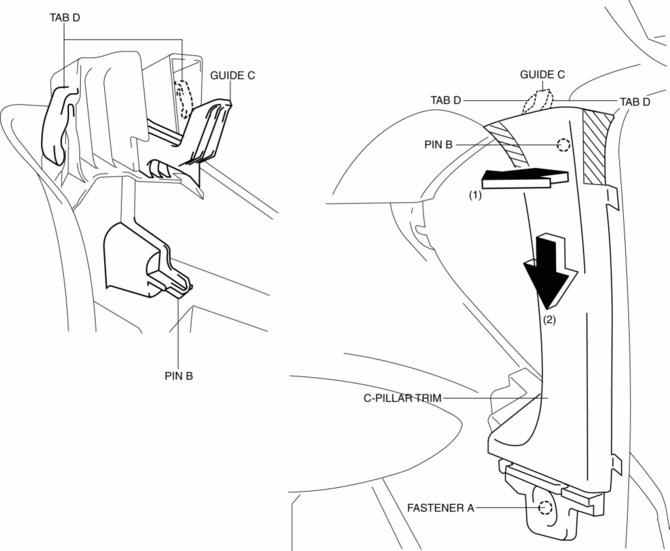
5. Take the shaded area shown in the figure, and pull the C-pillar trim in the direction of the arrow (1) while detaching the pin B.
6. Remove the C-pillar trim in the direction of the arrow (2) shown in the figure while detaching guide C, tabs D.
CAUTION:
-
If the C-pillar trim is pulled in the direction of the arrow (1) forcefully, guide C may be damaged. Carefully pull the C-pillar trim so as not to damage guide C.
7. Install in the reverse order of removal.
 B Pillar Upper Trim Removal/Installation
1. Remove the following parts:
a. Front scuff plate.
b. Rear scuff plate.
c. B-pillar lower trim.
d. Adjuster anchor cover.
e. Upper anchor installation bolts on the front seat belt.
2. Pa ...
 Center Panel Removal/Installation
1. Disconnect the negative battery cable..
2. Remove the decoration panel.
3. Take the shaded area shown in the figure, and pull the center panel in the
direction of the arrow in the order of (1 ...
Other materials:
Hazard Warning Switch Removal/Installation
1. Disconnect the negative battery cable..
2. Remove the decoration panel..
3. While pressing the hazard warning switch tab in the direction of the arrow
(1) shown in the figure, press the hazard warning switch in the direction of the
arrow (2) shown in the figure to detach the hazard warnin ...
Passenger Side Air Bag Module [Standard Deployment Control System]
Purpose
When the passenger-side air bag module receives an impact from a frontal
or frontal offset collision, the operation (deployment) of the air bag mediates
the impact to the head and face of the front passenger.
Function
When the passenger-side air bag module receives ...
Battery Recharging [Skyactiv G 2.0]
Using GR8-1291:
(See GR8-1291 INSTANT TRAINING MODULE (VIDEO).)
WARNING:
Keep all flames away from the battery, otherwise evaporated gas from the
battery fluid may catch fire and cause serious injury.
1. Remove the battery filler caps and check the water level. If necessary, add
...
