
Mazda CX-5 Service & Repair Manual: Auto Leveling Sensor Inspection
1. Disconnect the negative battery cable..
2. Remove the auto leveling sensor..
3. Prepare three dry cell batteries (1.5 V
).
4. Connect the three dry cell batteries in a series.
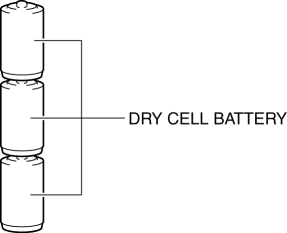
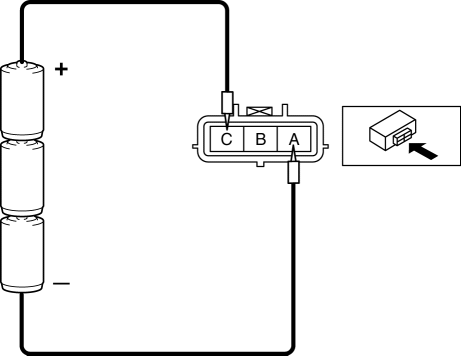
5. Connect the positive pole of the dry cell battery to auto leveling sensor terminal C, and the negative pole to terminal A.
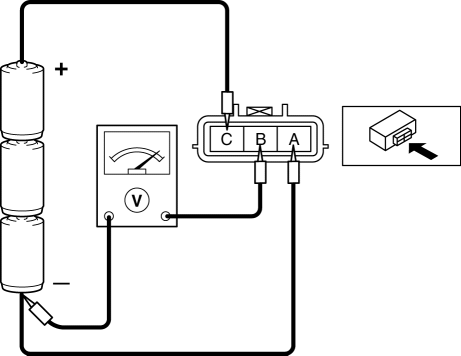
6. Connect the tester as shown in the figure with approx. 4.5 V
of voltage applied between auto leveling sensor terminals A and C, and measure the voltage at auto leveling sensor terminal B.
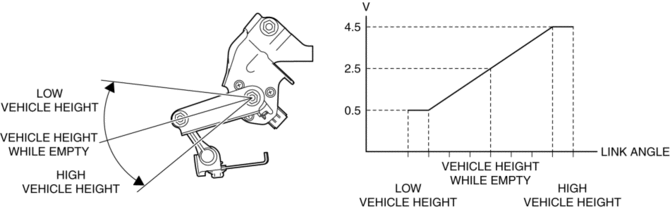
7. When slowly moving the auto leveling sensor link up and down, verify that the voltage fluctuates linearly between 0.5—4.5 V
as shown in the figure.
-
If the voltage cannot be verified as indicated in the graph, replace the auto leveling sensor.
 Auto Leveling Sensor
Purpose
Detects the vehicle height and outputs it to the AFS control module.
Function
Changes the detected vehicle height into a voltage value and outputs it to
the AFS control ...
 Auto Leveling Sensor Removal/Installation
1. Disconnect the negative battery cable..
2. Disconnect the connector.
3. Remove the bolts.
4. Remove the auto leveling sensor.
5. Install in the reverse order of removal.
6. Pe ...
Other materials:
Front Fender Junction Installation [Panel Replacement]
Symbol Mark
Installation Procedure
1. When installing new parts, measure and adjust the body as necessary to conform
with standard dimensions.
2. Drill holes for the plug welding before installing the new parts.
3. After temporarily installing new parts, make sure the related parts fit p ...
Steering Angle Sensor Inspection
1. Remove the column cover..
2. Connect the plus (+) end of a tester to steering angle sensor terminal A and
the minus (-) end of the tester to terminal B (GND).
3. Switch the ignition ON (engine off or on).
4. Turn the steering wheel to the left and right.
5. Verify that the voltage f ...
Front Door Key Cylinder Switch Inspection
1. Perform the front door glass preparation..
2. Disconnect the negative battery cable..
3. Remove the following parts:
a. Inner garnish.
b. Front door trim.
c. Front door key cylinder.
d. Front door glass.
e. Front door module panel.
f. Front door latch and lock actuator.
Front Do ...
