
Mazda CX-5 Service & Repair Manual: Rear ABS Wheel Speed Sensor Removal/Installation
1. Remove the trunk board..
2. Remove the trunk end trim..
3. Remove the rear scuff plate..
4. Remove the trunk side trim..
5. Disconnect the rear ABS wheel-speed sensor connector.
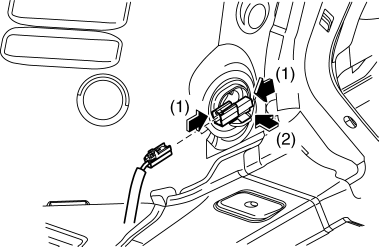
6. Press the rear ABS wheel-speed sensor tabs and press out the sensor toward the outside of the vehicle.
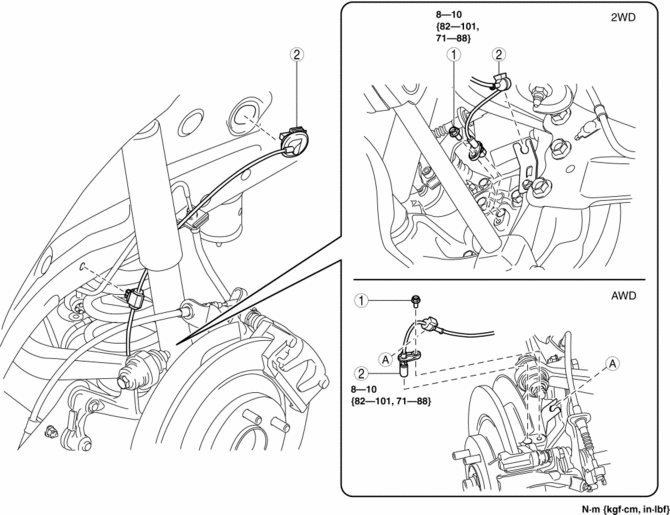
7. Remove in the order indicated in the table.
8. Install in the reverse order of removal.
9. After installation, verify that there is no twisting in the rear ABS wheel-speed sensor.
|
1 |
Bolt |
|
2 |
Rear ABS wheel-speed sensor (See Rear ABS Wheel-speed Sensor Removal Note.) |
Rear ABS Wheel-speed Sensor Removal Note
1. Pull aside the mudguard and remove the rear ABS wheel-speed sensor.
 Rear ABS Wheel Speed Sensor Inspection [Awd]
Installation Visual Inspection
1. Inspect the following items:
If there is any malfunction, replace the applicable part.
a. Excessive play of the ABS wheel-speed sensor
b. Deformation ...
 Steering Angle Sensor
Purpose, Function
The steering angle sensor outputs the steering angle and steering angle reference
point during the period which the EPS control module performs initial learning
(approx. ...
Other materials:
Clutch Unit Removal/Installation [C66 M R]
1. Disconnect the negative battery cable..
2. Remove the MTX..
3. Remove in the order indicated in the table.
4. Install in the reverse order of removal.
5. Add the specified amount of specified transaxle oil..
1
Boot
2
Clutch release ...
Starter Interlock Switch Removal/Installation [C66 M R]
1. Disconnect the negative battery cable..
2. Disconnect the starter interlock switch connector.
3. Remove the starter interlock using the following procedure:
a. Detach hook A in the direction of the arrow shown in the figure.
b. Slide the starter interlock switch in the direction of th ...
Rocking the Vehicle
WARNING
Do not spin the wheels at more than 56 km/h (35 mph), and do not allow anyone
to stand behind a wheel when pushing the vehicle: When the vehicle is stuck, spinning
the wheels at high speed is dangerous. The spinning tire could overheat and explode.
This could cause serious injuries.
...
