
Mazda CX-5 Service & Repair Manual: Clutch Unit Removal/Installation [C66 M R]
1. Disconnect the negative battery cable..
2. Remove the MTX..
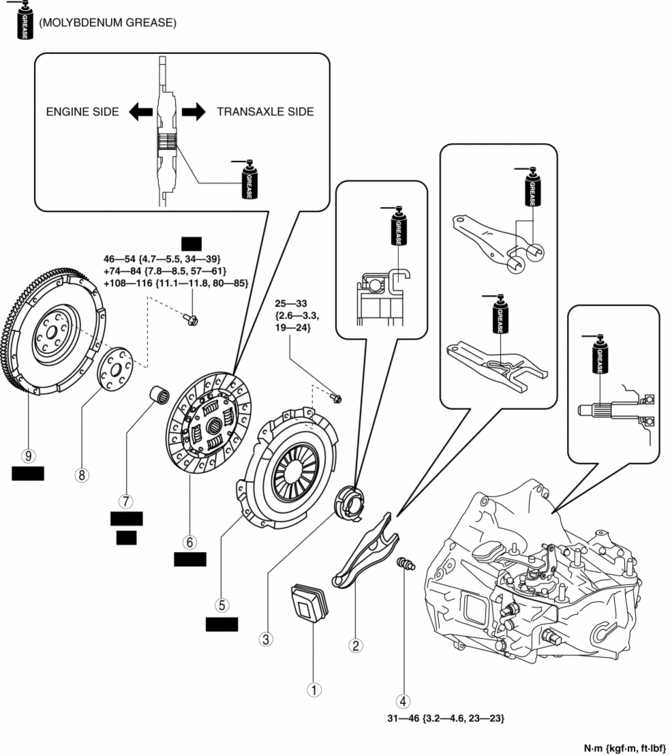
3. Remove in the order indicated in the table.
4. Install in the reverse order of removal.
5. Add the specified amount of specified transaxle oil..
|
1 |
Boot |
|
2 |
Clutch release fork |
|
3 |
Clutch release collar |
|
4 |
Pivot pin |
|
5 |
Clutch cover (See Clutch Cover and Disc Removal Note.) (See Clutch Disc and Cover Installation Note.) |
|
6 |
Clutch disc (See Clutch Cover and Disc Removal Note.) (See Clutch Disc and Cover Installation Note.) |
|
7 |
Pilot bearing (See Pilot Bearing Removal Note.) (See Pilot Bearing Installation Note.) |
|
8 |
Plate |
|
9 |
Flywheel (See Flywheel Removal Note.) (See Flywheel Installation Note.) |
Clutch Cover and Disc Removal Note
1. Hold the clutch unit using the SST
.
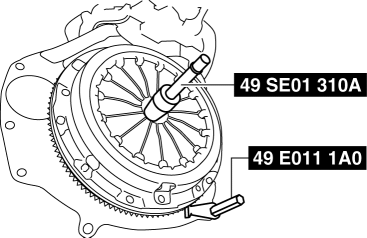
2. Loosen each bolt one turn at a time in a crisscross pattern until spring tension is released.
3. Remove the clutch cover and disc.
Pilot Bearing Removal Note
NOTE:
-
The pilot bearing does not need to be removed unless you are replacing it.
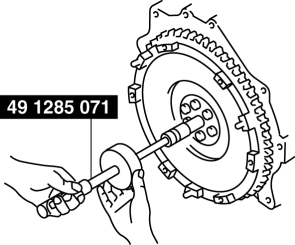
1. Use the SST
to remove the pilot bearing.
Flywheel Removal Note
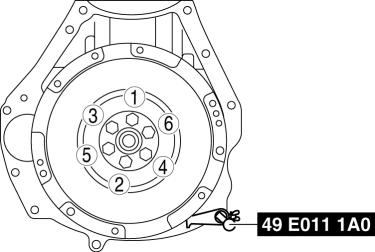
1. Hold the flywheel using the SST
.
2. Remove the lock bolts, and remove the plate and the flywheel.
3. Inspect for oil leakage from the crankshaft rear oil seal.
-
If there is any malfunction, replace the crankshaft rear oil seal..
Flywheel Installation Note
1. Clean the crankshaft thread holes.
2. Install the flywheel and the plate to the crankshaft, and temporarily tighten a new lock bolts.
3. Hold the flywheel using the SST
.
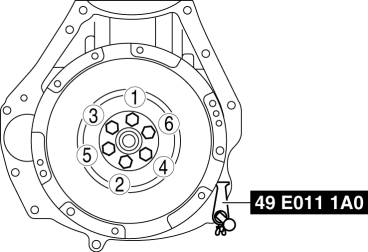
4. Tighten the lock bolts completely in the order shown in the figure in the following 3 steps.
-
Tightening torque
-
Step 1: 46—54 N·m {4.7—5.5 kgf·m, 34—39 ft·lbf}
-
Step 2: 76—84 N·m {7.8—8.5 kgf·m, 57—61 ft·lbf}
-
Step 3: 108—116 N·m {11.1—11.8 kgf·m, 80—85 ft·lbf}
Pilot Bearing Installation Note
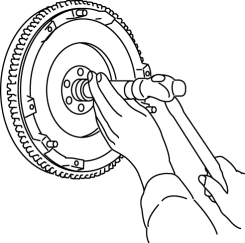
1. Install new pilot bearing to the specified position using the following tools.
-
Tool
-
Snap-on brand millimeter size bushing driver set (A160M) adapter A160M7 (20—22 mm)
-
Use the adapter with the 20 mm side of the A160M7 (20—22 mm) facing the pilot bearing side.
-
Substitution tool
-
Outer diameter: 21 mm {0.83 in}
-
Inner diameter: 19 mm {0.75 in}
-
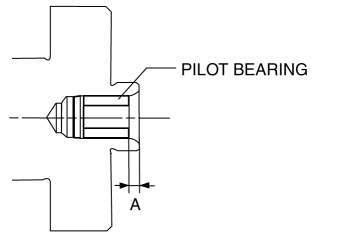
Standard position
-
Distance A of pilot bearing from crankshaft end: 1.5—2.5 mm {0.060—0.098 in}
Clutch Disc and Cover Installation Note
1. Hold the clutch disc position using the SST
.
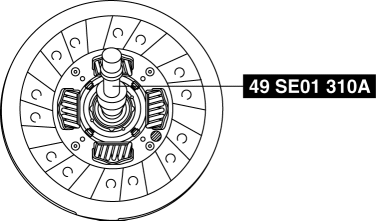
2. Hold the clutch unit using the SST
.
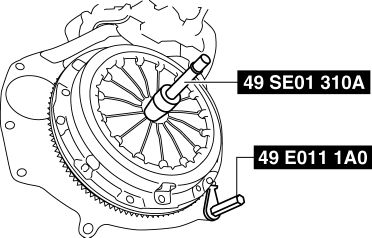
3. Tighten the bolts in Min. 2 stages.
a. Temporarily tighten the bolts in the order shown in the figure.
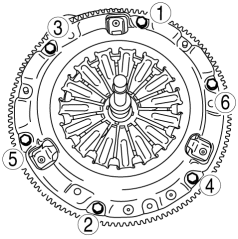
b. Tighten the bolts completely in the order shown in the figure and install the clutch disc and cover.
-
Tightening torque
-
25—33 N·m {2.6—3.3 kgf·m, 19—24 ft·lbf}
4. Remove the SST
s.
 Clutch Release Cylinder Removal/Installation [C66 M R]
CAUTION:
Do not allow clutch fluid to get on a painted surface. Clutch fluid contains
properties which can dissolve the paint. If clutch fluid gets on a painted surface,
wash it off with ...
 Clutch [C66 M R]
Purpose, Function
The clutch unit transmits or cuts the drive force between the engine and
MTX according to the clutch pedal operation.
Construction/Operation
The construction/o ...
Other materials:
Power Window Main Switch
Purpose
Remote control of door glass open/close and power outer mirror adjustment
are possible with occupant seated in the cabin.
Function
Power window main switch
Manual
When the power window main switch is operated for manual open/close operation,
it sends ...
R 3 5 Brake [Fw6 A EL, Fw6 Ax EL]
Purpose/Function
The R-3-5 brake operates in 3GR, 5GR and in reverse to lock the reduction
internal gear against rotation.
Construction
The R-3-5 brake consists of the following parts shown in the figure.
The driven plate of the R-3-5 brake does not rotate be ...
Oil Shower Pipe
Outline
Mechanical resistance loss has been reduced through structural changes to
achieve optimum fuel economy. An oil shower pipe has been adopted as a part
of this structural change.
Purpose, Function
The oil shower pipe injects engine oil to lubricate the contact points ...
