
Mazda CX-5 Service & Repair Manual: Pressure Sensor Removal/Installation [Two Step Deployment Control System]
WARNING:
-
Handling the pressure sensor improperly can accidentally operate (deploy) the air bag module, which may seriously injure you. Read the air bag system service warnings and cautions before handling the pressure sensor..
1. Switch the ignition to off.
2. Disconnect the negative battery cable and wait for 1 min or more
..
3. Remove the inner garnish..
4. Remove the front door trim..
5. Remove the bolts.
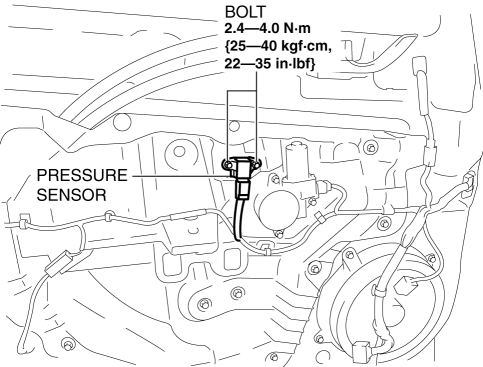
6. Remove the pressure sensor.
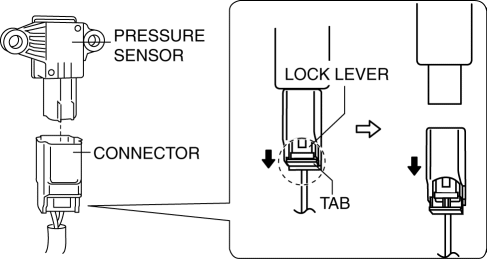
7. Disconnect the connector from the pressure sensor by pressing the connector tab and pulling out the lock lever in the direction of the arrow.
-
When connecting the pressure sensor connector, insert the lock lever (connector disconnection prevention lever) completely.
8. Install in the reverse order of removal.
9. Switch the ignition ON (engine off or on).
10. Verify that the air bag system warning light illuminates for approx. 6 s
and goes out.
-
If the air bag system warning light does not operate normally, refer to the on-board diagnostic system (air bag system) and perform inspection of the system..
 Pre Tensioner Seat Belt [Two Step Deployment Control System]
Purpose
The pre-tensioner seat belt retracts and tightens the seat belt webbing to
protect the front passengers during a collision.
Function
The pre-tensioner seat belts operate ...
 Pressure Sensor [Two Step Deployment Control System]
Purpose
The pressure sensor determines at an earlier stage whether to detonate the
air bag on the side of the vehicle (around front door) receiving an impact.
This is for improved accurac ...
Other materials:
Crankshaft, Main Bearing
Purpose, Function
The crankshaft converts the reciprocating movement of the piston to a rotational
movement via the connecting rod.
The main bearing forms an oil film on the outer surface of the crankshaft
journal to prevent wear due to sliding.
Construction
Crankshaft
...
Limitations to SRS Air Bag
In severe collisions such as those described previously in “SRS Air Bag Deployment
Criteria”, the applicable SRS air bag equipment will deploy. However, in some accidents,
the equipment may not deploy depending on the type of collision and its severity.
Limitations to front/near front colli ...
Engine Removal/Installation
WARNING:
A hot engine can cause severe burns. Turn off the engine and wait until it
is cool before servicing.
Fuel vapor is hazardous. It can very easily ignite, causing serious injury
and damage. Always keep sparks and flames away from fuel.
Fuel line spills and leakag ...
