
Mazda CX-5 Service & Repair Manual: Propeller Shaft On Vehicle Inspection
Joint Area Excessive Play Inspection
1. Shake the universal joint by hand and verify that there is no excessive play.
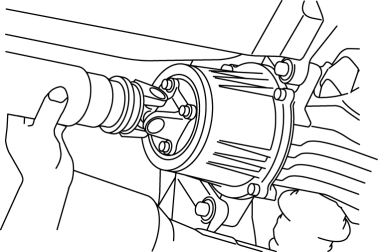
2. If there is any excessive play, replace the propeller shaft..
Propeller Shaft Runout Inspection
CAUTION:
-
Do not rotate the propeller shaft using engine force when inspecting.
1. Shift to neutral position and release the parking brake.
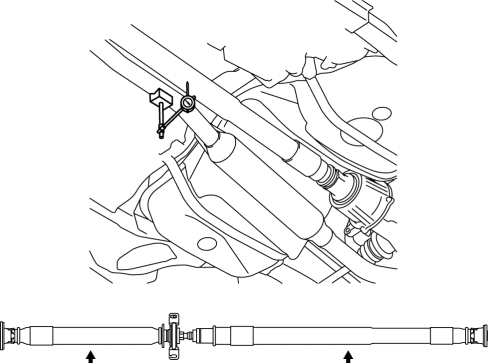
2. Rotate the rear wheel by hand and inspect the propeller shaft runout at the two locations shown in the figure.
-
If it exceeds the standard specification, replace the propeller shaft.
-
Standard propeller shaft runout (on-vehicle)
-
0.8 mm {0.031 in}
 Propeller Shaft Inspection
1. Measure the propeller shaft center runout using the dial gauge.
If it exceeds the maximum specification, replace the propeller shaft as a
single component.
Propeller shaft m ...
 Propeller Shaft Removal/Installation
CAUTION:
If the constant velocity joint is bent during propeller shaft removal/installation
or transportation after servicing, the constant velocity joint boot may contact
the metallic c ...
Other materials:
Brake Fluid Pressure Sensor Inspection
1. Switch the ignition to off.
2. Remove the clips.
3. Set the splash shield out of the way.
4. Disconnect the brake pipe from the LF brake hose.
5. Remove the clip.
6. Remove the LF brake hose from the bracket.
7. Detach the brake pipe from the pipe holder.
8. Install the SST ...
Front Shock Absorber And Coil Spring Removal/Installation
CAUTION:
Performing the following procedures without first removing the front ABS
wheel-speed sensor may possibly cause an open circuit in the wiring harness
if it is pulled by mistake. Before performing the following procedures, disconnect
the front ABS wheel-speed sensor wiring ...
Cooling Fan Motor Inspection
Part Inspection
1. Verify that the battery is fully charged..
2. Disconnect the cooling fan motor connector (2 terminals).
3. Install a tester and battery to the cooling fan motor connector (2 terminals)
as shown in the figure.
4. Verify that each cooling fan motors operate smoothly at ...
