
Mazda CX-5 Service & Repair Manual: Heated Oxygen Sensor (HO2 S) Heater Control
Outline
-
Based on the control of the HO2S heater, a stabilized oxygen concentration is detected even at low exhaust temperatures, and feedback control of fuel injection even at cold engine start is made possible for improved cold temperature exhaust emission performance.
-
Both emission performance and sensor protection have been improved by duty control of the heater according to engine operation conditions (exhaust gas temperature)
Block Diagram
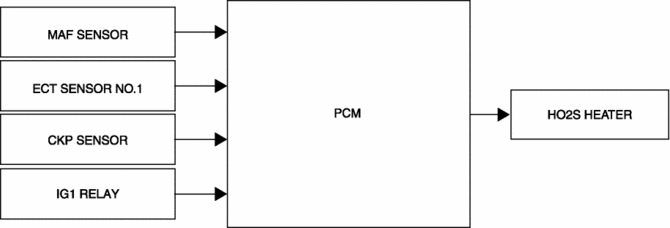
Operation
-
The PCM operates the HO2S heater based on the following control conditions.
|
Output duty ratio |
Control condition |
|
0% |
|
|
30% |
|
|
0?100% (Determined by engine speed and charging efficiency) |
|
 Engine Coolant Temperature (ECT) Sensor
Purpose/Function
Detects the ECT as basic information for mainly determining the fuel injection
amount.
Detects the ECT and inputs it to the PCM as an ECT signal.
The ECT sen ...
 Heated Oxygen Sensor (HO2 S) Inspection
HO2S Inspection
1. Connect the M-MDS to the DLC?2.
2. Switch the ignition ON (engine on).
3. Warm up the engine to normal operating temperature.
4. Access the following PIDs using the M-MDS..
...
Other materials:
Control Valve Body Removal/Installation [Fw6 A EL, Fw6 Ax EL]
On-Vehicle Removal
WARNING:
A hot transaxle and ATF can cause severe burns. Turn off the engine and wait
until they are cool.
Using compressed air can cause dirt and other particles to fly out, causing
injury to the eyes. Wear protective eyeglasses whenever using compressed ai ...
Instrument Cluster Operation Record
Purpose
The instrument cluster operation record stores the record of the illumination
or flashing of the warning light.
Function
The operation record is stored by the instrument cluster and displayed using
the Mazda Modular Diagnostic System (M-MDS).
The instrument ...
Turn Light System
Purpose
The turn light system flashes the turn light three times automatically according
to the turn switch operation.
The front body control module (FBCM) performs turn light system fail-safe..
Function
The front body control module (FBCM) performs control based on th ...
