
Mazda CX-5 Service & Repair Manual: Turn Light System
Purpose
-
The turn light system flashes the turn light three times automatically according to the turn switch operation.
-
The front body control module (FBCM) performs turn light system fail-safe..
Function
-
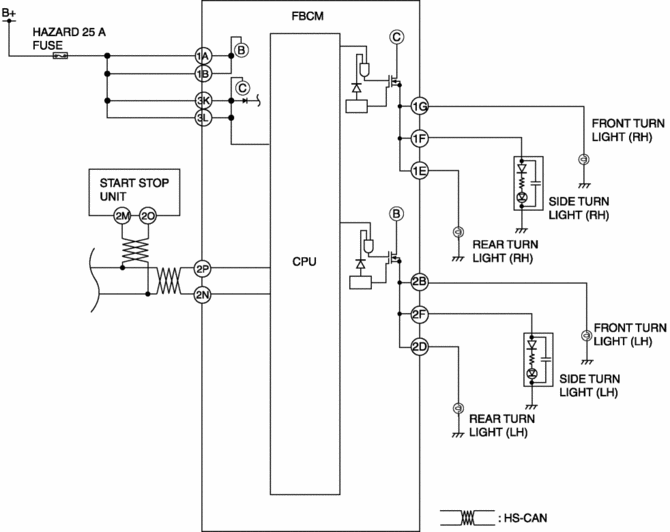
The front body control module (FBCM) performs control based on the turn switch (RH or LH) signal sent from the start stop unit via the CAN signal as follows:
-
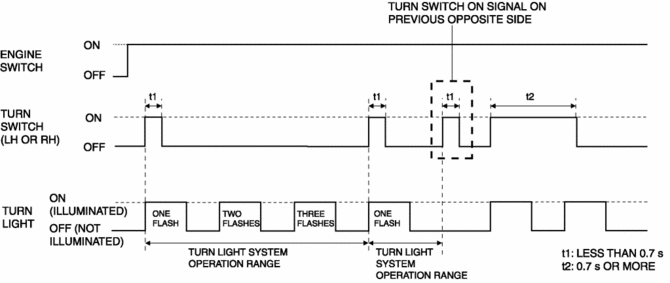
On-signal receive time of turn switch is less than 0.7 s: Operates the turn light system.
-
On-signal receive time of turn switch is 0.7 s or more: Flashes the turn light according to the receive time.
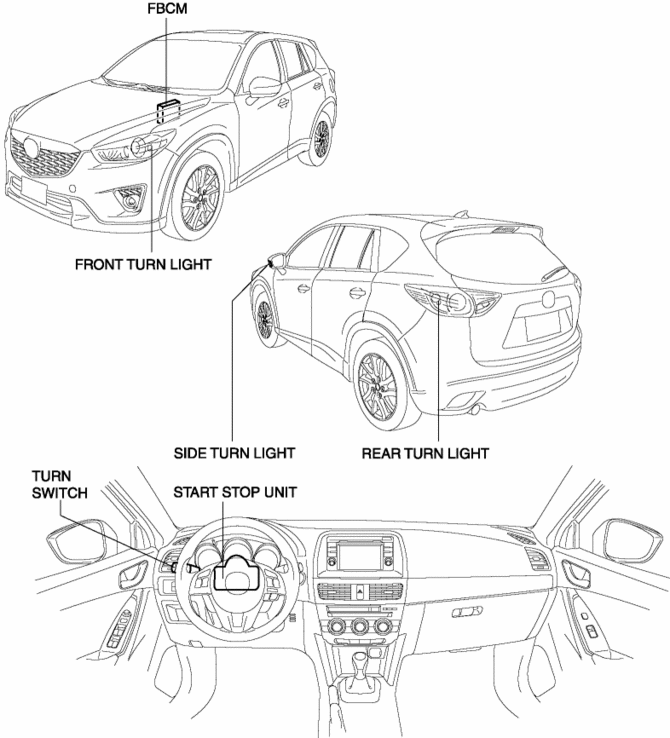
Structural view
System wiring diagram
Operation
-
If the front body control module (FBCM) receives the turn switch on signal from the start stop unit for less than 0.7 s when the ignition is switched ON (engine off or on), it flashes the turn light three times.
-
If the front body control module (FBCM) receives the turn switch on signal from the previous opposite side during the turn light system operation, it stop the turn light system operation. In addition, if the turn switch on signal on the opposite side is less than 0.7 s, the turn light system does not operate.
 Side Turn Light Removal/Installation
1. Disconnect the negative battery cable..
2. Remove the following parts:
a. Outer mirror glass.
b. Upper outer mirror garnish.
3. Remove the screws.
4. Disconnect the connector.
5. Re ...
 Vanity Mirror Illumination Inspection
1. Disconnect the negative battery cable..
2. Remove the sunvisor..
3. Verify that the continuity between the vanity mirror illumination terminals
is as indicated in the table.
I ...
Other materials:
Cowl Grille Removal/Installation
1. Remove the windshield wiper arm and blade..
2. Pull the front fender molding in the direction of the arrow (1) while detaching
hook A.
3. Pull the front fender molding in the direction of the arrow (2) while detaching
hook B.
4. Pull the front fender molding in the direction of ...
Steering Features
Improved handling, fuel economy, marketability
Column assist type Electric Power Steering (EPS) adopted
Improved handling
By using a higher steering gear ratio (15.5), the steerability has
been improved
...
Charcoal Canister Removal/Installation
U.S.A. And CANADA
1. Disconnect the negative battery cable..
2. Remove the floor under cover..
3. Remove in the order indicated in the table.
1
Quick release connector
(See QUICK RELEASE CONNECTOR (EMISSION SYSTEM) REMOVAL/INSTALLATION [SKYACTIV-G
2.0].)
...
