
Mazda CX-5 Service & Repair Manual: Windshield Washer Nozzle Removal/Installation
1. Remove the following parts:
a. Windshield wiper arm and blade.
b. Cowl grille.
2. Disconnect the windshield washer hose from the windshield washer nozzle..
3. While pressing windshield washer nozzle tabs in the direction of the arrow (1) shown in the figure, pull the windshield washer nozzle in the direction of the arrow (2) to remove it from the cowl grille.
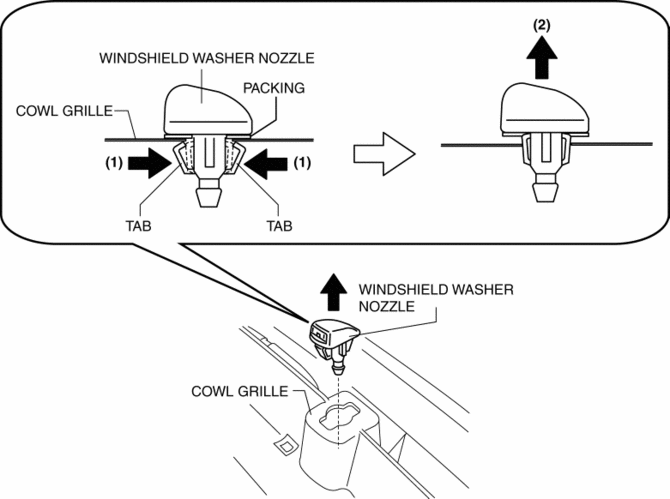
4. Install in the reverse order of removal.
5. Adjust the windshield washer nozzle..
 Windshield Washer Nozzle Adjustment
CAUTION:
If the nozzle is adjusted by inserting a stick-like object into the nozzle,
it could deform the injection nozzle and the washer fluid may not spray normally.
When adjusting the ...
 Washer Fluid Level Sensor
Purpose
The washer fluid-level sensor illuminates the low washer fluid level warning
light when the washer fluid level is lowered.
Function
The washer fluid-level sensor detects ...
Other materials:
Power Seat System
Outline
The power seat system drives the electric motor, operates the front seat
safely, and changes the driving posture to suit the occupant by operating the
power seat switch.
8 way power seats or 6 way power seats have been adopted on the driver's
seat.
Function
...
Air Cleaner Element Inspection
1. Remove the air cleaner element..
2. Inspect the following items:
Has the replacement interval past?
Is the air cleaner element soiled, damaged, or bent?
Are the air cleaner case and the air cleaner element correctly sealed?
Is the correct air cleaner element inst ...
Exhaust Gas Purification System
Purpose, Outline
Purifies contaminants (HC, CO, NOx) in the exhaust gas by utilizing the chemical
reactions of the three-way catalytic converter.
System Diagram
Structure
The exhaust gas purification system consists of the following parts:
Par ...
