
Mazda CX-5 Service & Repair Manual: Side Garnish Removal
Front
1. Insert a tape-wrapped flathead screwdriver in the position shown in the figure, move it in the direction of the arrow (1) to remove the clip A.
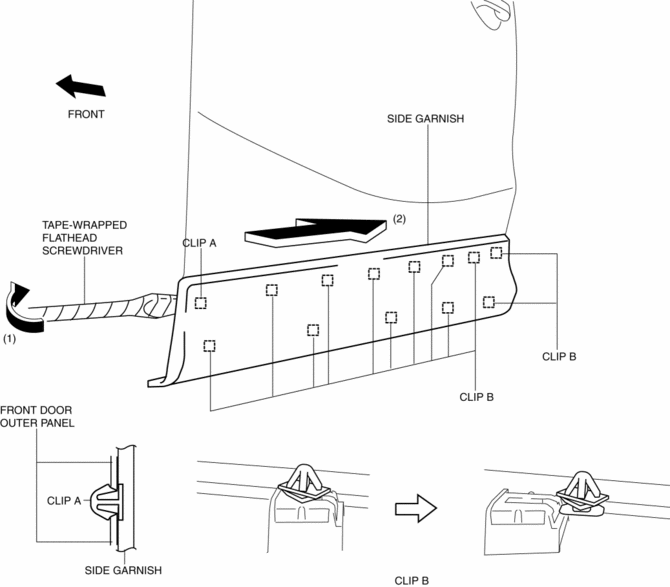
2. Slide the side garnish in the direction of the arrow (2) shown in the figure and remove clips B from side garnish.
3. Remove clips B from the body.
4. When reusing the side garnish, install clip A and B to the body.
Rear
1. Insert a tape-wrapped flathead screwdriver in the position shown in the figure, move it in the direction of the arrow (1) to remove the clip A.
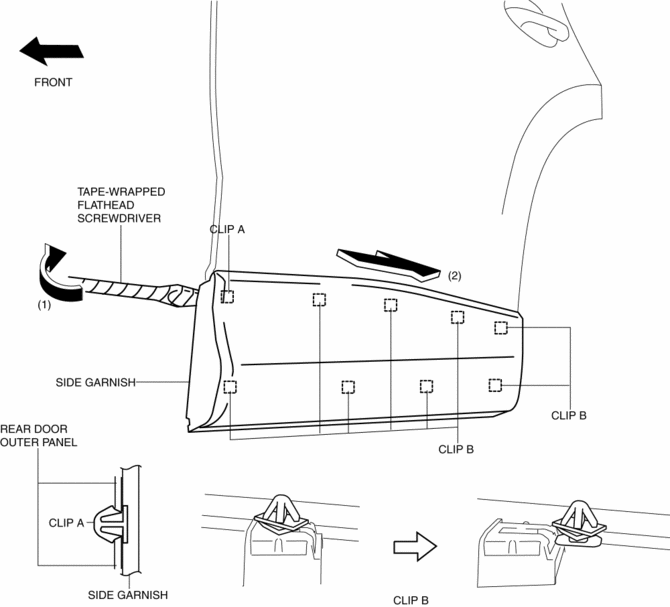
2. Slide the side garnish in the direction of the arrow (2) shown in the figure and remove clips B from side garnish.
3. Install clips B to the body.
4. When reusing the side garnish, install clip A and B to the body.
 Side Garnish Installation
1. Install clip A.
Front
Rear
2. Install clip B to the vehicle from the front side. ...
 Side Sill Panel Installation [Panel Replacement]
Symbol Mark
Installation Procedure
Side sill (front side)
1. When installing new parts, measure and adjust the body as necessary to conform
with standard dimensions.
2. Drill holes for the ...
Other materials:
Front Console Removal/Installation
CAUTION:
Affix protective tape to the position shown in the figure.
1. Disconnect the negative battery cable..
2. Remove the following parts:
a. Decoration panel.
b. Shift lever knob (MTX).
c. Front console box.
d. Shift panel.
e. Upper panel.
f. Rear console.
g. ...
Lubrication System
Outline
Pressure loss is reduced by optimizing the oil passage.
With the adoption of the chain drive type oil pump, oil pump drive force
has been reduced.
With the adoption of the oil shower pipe, sliding resistance has been reduced.
With the adoption of the engine ...
Controller Area Network (Can)
Outline
The AWD control module (CM) sends and receives data to and from other modules
via the CAN system. Refer to MULTIPLEX COMMUNICATION SYSTEM for a detailed explanation
of the CAN system..
Data sent
AWD system status
Data received
Engine speed
Engin ...
