
Mazda CX-5 Owners Manual: Service Publications
Service
Publications
Factory-authorized Mazda service publications are available for owners who wish to do some of their own maintenance and repair.
When requesting any of our publications through an Authorized Mazda Dealer, refer to the chart below.
If they do not have what you need in stock, they can order it for you.
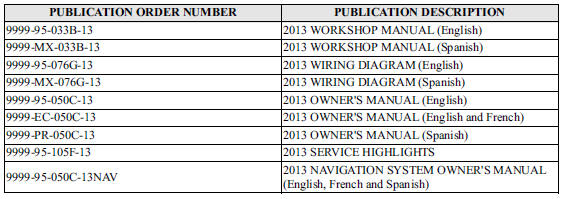
WORKSHOP MANUAL:
Covers recommended maintenance and repair procedures of the drive train, body and chassis.
WIRING DIAGRAM:
Provides electrical schematics as well as component location for the entire electrical system.
OWNER'S MANUAL:
This booklet contains information regarding the proper care and operation of your vehicle.
This is not a technician's manual.
SERVICE HIGHLIGHTS:
Provides description and operation of the many systems of your Mazda.
NAVIGATION SYSTEM OWNER'S MANUAL:
This booklet contains information regarding the proper operation and use of the navigation system. This is not a technician's manual.
 Declaration of Conformity
Declaration of Conformity
Keyless Entry System/Immobilizer System
Blind Spot Monitoring (BSM) System
Radiation Hazard
This BSM (blind spot monitoring) device emits intentional electromagnetic ra ...
 Specifications
Technical information about your Mazda. ...
Other materials:
Refrigerant Line
Purpose
The system piping connects each related part of the refrigerant system.
Construction
Block-type piping has been adopted to the pipe connection, improving the
efficiency of piping related servicing.
The pipes in the piping system consist of the following parts.
...
Glass Antenna
Purpose, Function
The RDS (Radio Data System) converts radio broadcast waves to electric signals
and sends the signals to the audio unit.
Construction
An antenna with excellent noise resistance has been adopted to the rear window
glass.
Fail-safe
Function n ...
Active Command Modes Inspection [Rear Body Control Module (Rbcm)]
1. Connect the M-MDS to the DLC-2.
2. After the vehicle is identified, select the following items from the initialization
screen of the M-MDS.
a. Select “DataLogger”.
b. Select “Modules”.
c. Select “R_BCM”.
3. Select the simulation items from the PID table.
4. Perform the a ...
