
Mazda CX-5 Service & Repair Manual: Receiver/Drier Removal/Installation
1. Disconnect the negative battery cable..
2. Discharge the refrigerant..
3. Remove the front under cover No.1..
4. Drain the engine coolant..
5. Remove the following parts:
a. Plug hole plate.
b. Air cleaner, air hose and fresh air duct component.
c. Coolant reserve tank.
d. Cooling fan component.
e. Radiator.
6. Remove the condenser..
7. Disconnect the block joint type pipes by grasping female side of the block with hand holding firmly then loosen the connection bolt A.
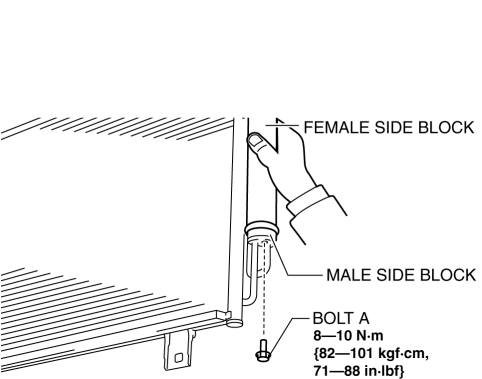
8. Remove bolt B.
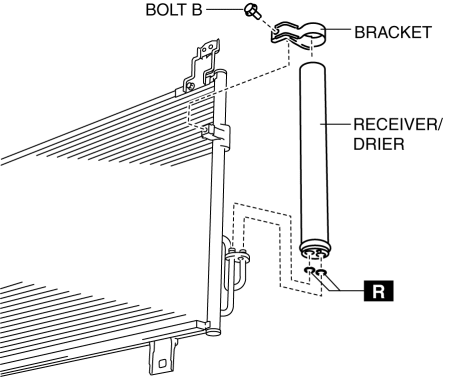
9. Remove the bracket.
10. Remove the receiver/drier. Do not allow compressor oil to spill.
CAUTION:
-
If moisture or foreign material enters the refrigeration cycle, cooling ability will be lowered and abnormal noise will occur. Always immediately plug all open fittings after removing any refrigeration cycle parts to keep moisture or foreign material out of the cycle.
11. Install in the reverse order of removal.
12. Inspect for engine coolant leakage..
13. Perform the refrigerant system performance test..
Receiver/drier Installation Note
1. After replacing the receiver/drier, add compressor oil to the refrigeration cycle.
-
Supplemental oil amount (approx. quantity)
-
2 ml {2 cc, 0.1 fl oz}
 Power Metal Oxide Semiconductor Field Effect Transistor (Power Mos Fet) [Full
Auto Air Conditioner]
Power Metal Oxide Semiconductor Field Effect Transistor (Power Mos Fet) [Full
Auto Air Conditioner]
Purpose
The power MOS FET controls the blower motor rotation speed.
Function
The power MOS FET controls the supply voltage to the blower motor based on
the gate voltage sent fro ...
 Refrigerant Charging
CAUTION:
Do not use a different type of refrigerant or charge beyond the specified
level. Otherwise, cooling ability will be lowered and the A/C compressor could
be damaged.
Chargi ...
Other materials:
Intake Air Temperature (Iat) Sensor
IAT Sensor No.1
Purpose/Function
Detects the IAT before it passes through the throttle body as basic information
for mainly determining the fuel injection amount.
Detects the IAT before it passes through the throttle body and inputs it
to the PCM as an IAT signal.
Constru ...
Master Cylinder Removal/Installation
1. Remove the battery..
2. Remove in the order indicated in the table.
3. Install in the reverse order of removal.
4. After installation, add brake fluid, bleed the air, and inspect for fluid
leakage..
1
Brake fluid level sensor connector
2
...
Liftgate Garnish Removal/Installation
1. Disconnect the negative battery cable..
2. Remove the following parts:
a. Liftgate upper trim.
b. Liftgate side trim.
c. Liftgate recess.
d. Liftgate lower trim.
3. Disconnect the connectors.
4. Remove nuts A.
5. Detach clips B shown in the figure.
6. Remove the liftgate ...
