
Mazda CX-5 Service & Repair Manual: Rear Trailing Link Removal/Installation
1. Remove the floor under cover..
2. Disconnect the rear parking cable..
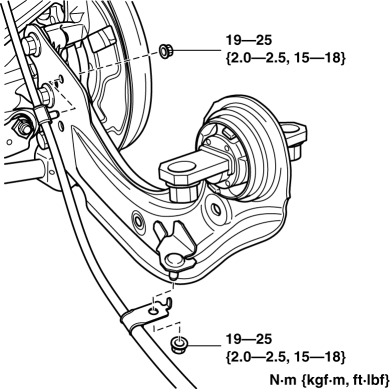
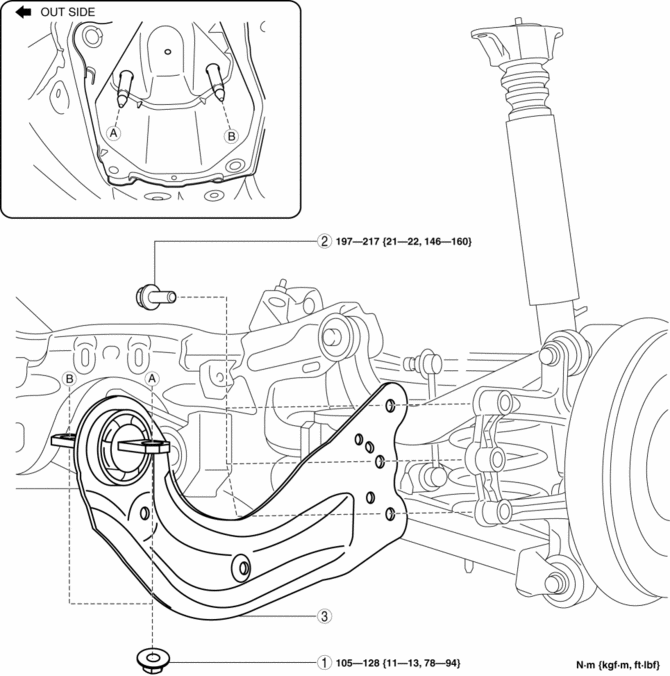
3. Remove in the order indicated in the table.
4. Install in the reverse order of removal.
5. Inspect the wheel alignment and adjust it if necessary..
|
1 |
Rear trailing link installation nut |
|
2 |
Rear trailing link installation bolt |
|
3 |
Rear trailing link (See Rear Trailing link Installation Note.) |
Rear Trailing link Installation Note
1. Install the rear trailing link installation bolts using a jack.
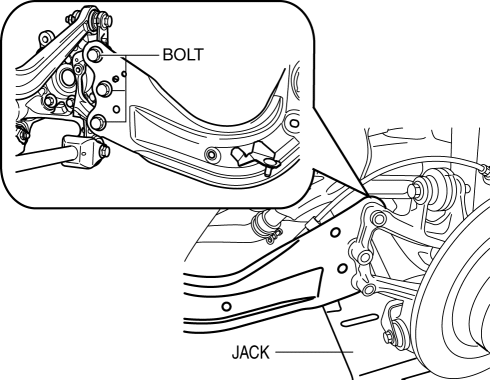
2. Install the rear trailing link installation nut.
 General Procedures (Suspension)
Wheel and Tire Installation
1. When installing the wheels and tires, tighten the wheel nuts in a criss-cross
pattern to the following tightening torque.
Tightening torque
108—14 ...
 Rear Wheel Hub Bolt Replacement
1. Remove the brake calliper component and suspend it out of the way using a
cable.
2. Remove the disc plate.
3. Remove the wheel hub bolt using the SST as shown in the figure.
4. Place ...
Other materials:
Climate Control Unit Disassembly/Assembly [Manual Air Conditioner]
1. Disassemble in the order indicated in the figure.
1
Dial
2
Airflow mode wire
(See Wire Removal Note.)
(See Wire Installation Note.)
3
Air mix wire
(See Wire Removal Note.)
(See Wire Installation Note ...
Switch Panel Removal/Installation
1. Disconnect the negative battery cable..
2. Remove the car-navigation unit. (with car-navigation system).
3. Insert your hand from the lower side of the lower panel (without car-navigation
system) or the area where the car-navigation unit was installed (with car-navigation
system), press t ...
Ignition Switch
Push Button Start Positions
The system operates only when the driver is in the vehicle or within operational
range while the key is being carried.
Each time the push button start is pressed, the ignition switches in the order
of off, ACC, and ON. Pressing the push button start again from ON sw ...
