
Mazda CX-5 Service & Repair Manual: General Procedures (Suspension)
Wheel and Tire Installation
1. When installing the wheels and tires, tighten the wheel nuts in a criss-cross pattern to the following tightening torque.
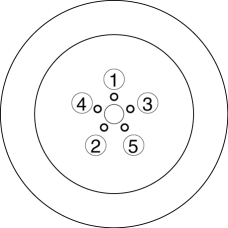
-
Tightening torque
-
108—147 N·m {12—14 kgf·m, 80—108 ft·lbf}
Suspension Links Removal/Installation
1. For the joint sections with rubber bushings, raise the vehicle using a lift, and then temporarily tighten the installation bolts and nuts. Lower the vehicle to the ground and tighten them to the specified tightening torque.
Connector Disconnection
1. Disconnect the negative battery cable before performing any work that requires handling of connectors..
Headlight Auto Leveling System Initialization (Vehicle with discharge headlight system)
1. Initialize the auto leveling sensor, when performing the following services..
-
Removing the auto leveling sensor
-
Disconnecting the auto leveling sensor link
-
Removing the suspension parts related the vehicle height
 General
...
 Rear Trailing Link Removal/Installation
1. Remove the floor under cover..
2. Disconnect the rear parking cable..
3. Remove in the order indicated in the table.
4. Install in the reverse order of removal.
5. Inspect the wheel a ...
Other materials:
ABS Wheel Speed Sensor And ABS Sensor Rotor
Purpose/Function
The ABS wheel-speed sensor and ABS sensor rotor detect the rotation condition
of each wheel and transmit this information to the DSC HU/CM.
The signal from the ABS wheel-speed sensor is the primary signal that the
DSC HU/CM uses when carrying out control.
...
Rear Window Defroster
The rear window defroster clears frost, fog, and thin ice from the rear window.
The ignition must be switched ON.
Press the switch to turn on the rear window defroster. The rear window defroster
operates for about 15 minutes and turns off automatically.
The indicator light illuminates during op ...
Fuses
Your vehicle's electrical system is protected by fuses.
If any lights, accessories, or controls do not work, inspect the appropriate
circuit protector. If a fuse has blown, the inside element will be melted.
If the same fuse blows again, avoid using that system and consult an Authorized
Ma ...
