
Mazda CX-5 Service & Repair Manual: Rear Door Garnish Removal/Installation
WARNING:
-
Using a utility knife with bare hands can cause injury. Always wear gloves when using a utility knife.
Front
1. Using a tape-wrapped fastener remover, remove clips A in the direction of arrow (1), (2) shown in the figure.
2. Remove the double-sided adhesive tape in the position shown in the figure using the utility knife, remove the rear door garnish from the rear door sash.
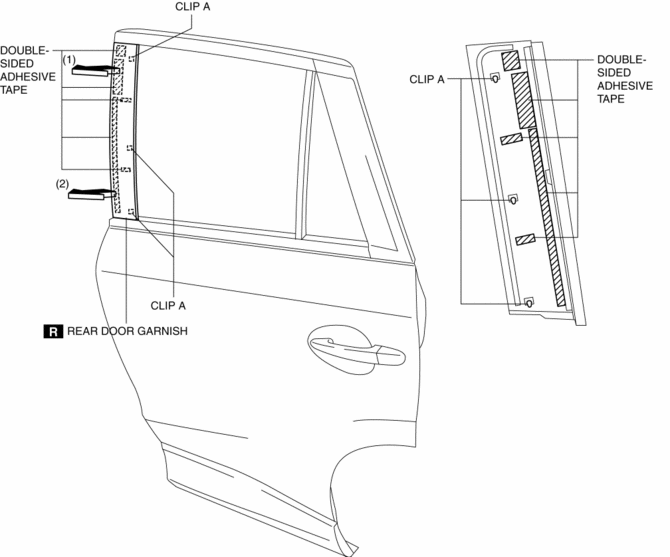
3. Install in the reverse order of removal.
Rear
1. Using a tape-wrapped fastener remover, remove clips B in the direction of arrow (1), (2) shown in the figure.
2. Remove the double-sided adhesive tape in the position shown in the figure using the utility knife, remove the rear door garnish from the rear door sash.
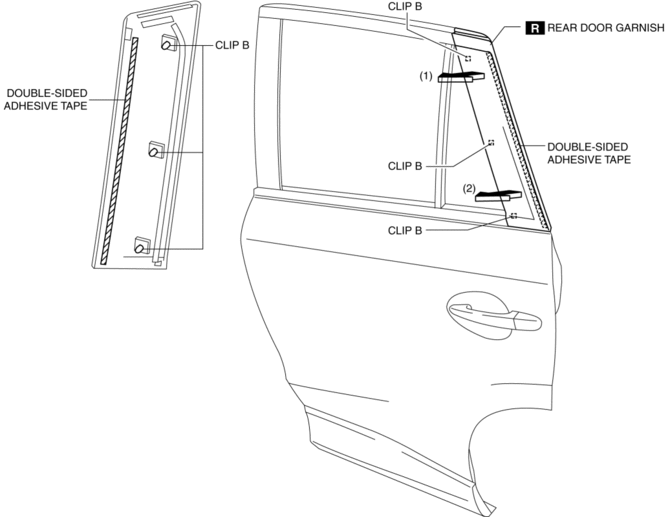
3. Install in the reverse order of removal.
 Rear Door Checker Removal/Installation
1. Fully close the rear door glass.
2. Disconnect the negative battery cable..
3. Remove the rear door trim..
4. Remove the rear door speaker..
5. Remove bolt.
6. Remove nuts.
7. P ...
 Rear Door Hinge Removal/Installation
1. Disconnect the negative battery cable..
2. Remove the following parts:
a. Rear door.
b. Front scuff plate.
c. Rear scuff plate.
d. B-pillar lower trim.
3. Remove in the order shown in t ...
Other materials:
Wiper Bracket Removal [Panel Replacement]
Symbol Mark
Installation Procedure
1. When installing new parts, measure and adjust the body as necessary to conform
with standard dimensions.
2. Drill holes for the plug welding before installing the new parts.
3. After temporarily installing new parts, make sure the related parts fit p ...
Light Switch Inspection
Light Switch
1. Disconnect the negative battery cable..
2. Remove the column cover..
3. Remove the light switch..
4. Verify that the continuity between the light switch terminals is as indicated
in the table.
Vehicles without auto light system
Vehicles with auto light system
...
Fuel Pump Control Module
Purpose, Function
Controls the voltage applied to the fuel pump for reducing fuel pump load
and improving fuel economy.
Controls the voltage applied to the fuel pump based on the control signal
from the PCM.
Construction
The fuel pump control module is installed bel ...
