
Mazda CX-5 Service & Repair Manual: Rear ABS Wheel Speed Sensor Removal/Installation
1. Remove the trunk board..
2. Remove the trunk end trim..
3. Remove the rear scuff plate..
4. Remove the trunk side trim..
5. Disconnect the rear ABS wheel-speed sensor connector.
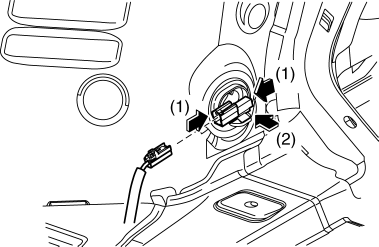
6. Press the rear ABS wheel-speed sensor tabs and press out the sensor toward the outside of the vehicle.
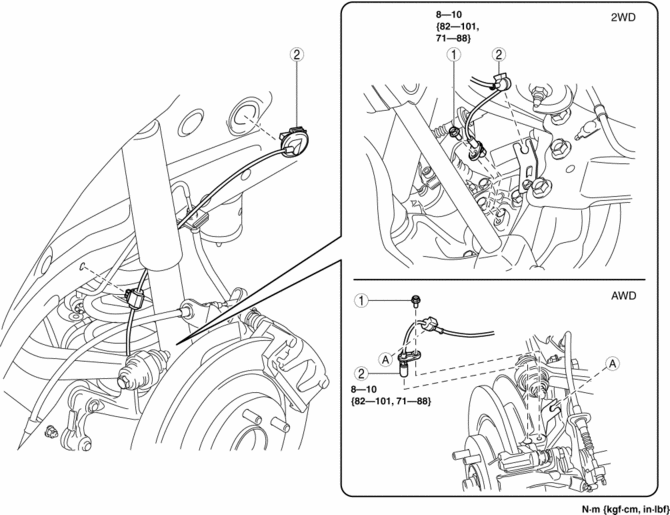
7. Remove in the order indicated in the table.
8. Install in the reverse order of removal.
9. After installation, verify that there is no twisting in the rear ABS wheel-speed sensor.
|
1 |
Bolt |
|
2 |
Rear ABS wheel-speed sensor (See Rear ABS Wheel-speed Sensor Removal Note.) |
Rear ABS Wheel-speed Sensor Removal Note
1. Pull aside the mudguard and remove the rear ABS wheel-speed sensor.
 Rear ABS Wheel Speed Sensor Inspection [Awd]
Installation Visual Inspection
1. Inspect the following items:
If there is any malfunction, replace the applicable part.
a. Excessive play of the ABS wheel-speed sensor
b. Deformation ...
 Steering Angle Sensor
Purpose, Function
The steering angle sensor outputs the steering angle and steering angle reference
point during the period which the EPS control module performs initial learning
(approx. ...
Other materials:
Battery Removal/Installation [Skyactiv G 2.0]
1. Remove in the order indicated in the table.
2. Install in the reverse order of removal.
1
Negative battery cable
(See NEGATIVE BATTERY CABLE DISCONNECTION/CONNECTION [SKYACTIV-G 2.0].)
2
Positive battery cable
3
...
Front Fog Light Switch Inspection
1. Disconnect the negative battery cable..
2. Remove the column cover..
3. Remove the light switch..
4. Verify that the continuity between the light switch terminals is as indicated
in the table.
If not as indicated in the table, replace the light switch.
...
Rear Shock Absorber Removal/Installation
1. Remove in the order indicated in the table.
2. Install in the reverse order of removal.
1
Rear shock absorber upper nut
(See Rear Shock Absorber Upper nut Installation Note.)
2
Rear shock absorber lower bolt
3
...
