
Mazda CX-5 Service & Repair Manual: Pressure Sensor [Two Step Deployment Control System]
Purpose
-
The pressure sensor determines at an earlier stage whether to detonate the air bag on the side of the vehicle (around front door) receiving an impact. This is for improved accuracy of the side air bag operation (deployment).
Function
-
When the vehicle is involved in a side-impact collision, the pressure sensor detects air pressure applied to the internal front door and sends an air bag deployment signal to the SAS control module.
Construction
-
A pressure detection sensor is built into the pressure sensor.
-
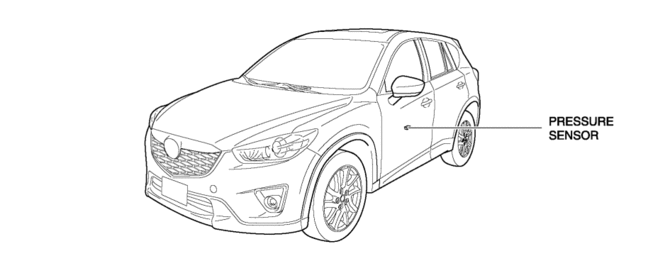
Located inside the center of the front doors.
Operation
1. If the vehicle is involved in a side-impact collision, air pressure is generated in the sealed front door and applied to the pressure sensor.
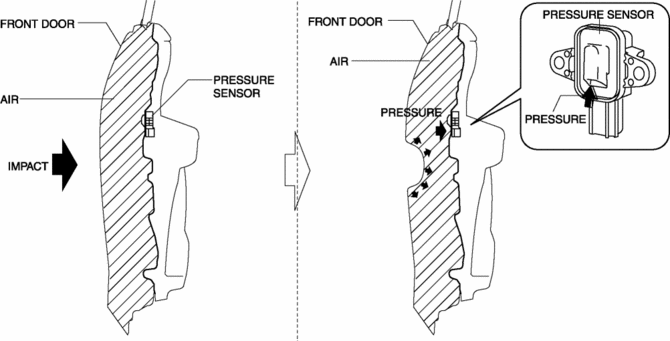
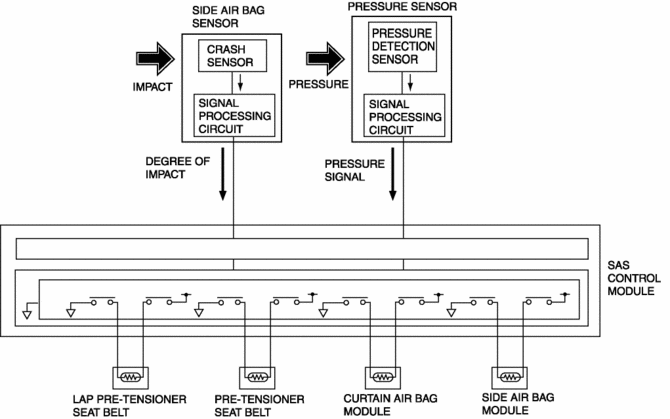
2. The pressure detection sensor built into the pressure sensor detects the pressure and converts the pressure into an electrical signal at the signal processing circuit.
3. The pressure signal, which is converted to an electrical signal, is sent to the SAS control module.
Fail-safe
-
Function not equipped.
 Pressure Sensor Removal/Installation [Two Step Deployment Control System]
WARNING:
Handling the pressure sensor improperly can accidentally operate (deploy)
the air bag module, which may seriously injure you. Read the air bag system
service warnings and cautio ...
 Purge Control
Outline
An appropriate amount of evaporative gas is fed into the intake manifold
by the purge solenoid valve operation according to the engine operation conditions.
This ensures driveabil ...
Other materials:
Fuel Injector Relay [Skyactiv G 2.0]
Purpose, Function
Supplies power to the PCM for the fuel injector and spill valve control solenoid
valve operation.
Construction
The fuel injector relay is installed in the relay and fuse block.
Operation
When the ignition is switched ON, the battery voltage ...
Catch Tank
Purpose, Function
Suppresses pulsation occurring before evaporative gas is inducted into the
intake manifold.
Construction
The catch tank is installed in the engine compartment.
Operation
When evaporative gas flows from the charcoal canister to the purge sol ...
Lap Pre Tensioner Seat Belt [Two Step Deployment Control System]
Purpose
The lap pre-tensioner seat belts retract and tighten the seat belt webbing
to protect the front passengers during a collision.
Function
The lap pre-tensioner seat belts operate (deploy) based on the operation
signal from the SAS control module to instantly retract a ...
