
Mazda CX-5 Service & Repair Manual: Pre Tensioner Seat Belt [Standard Deployment Control System]
Purpose
-
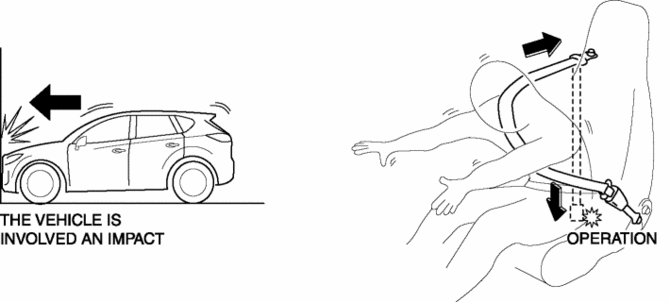
The pre-tensioner seat belt retracts and tightens the seat belt webbing to protect the front passengers during a collision.
Function
-
The pre-tensioner seat belts operate (deploy) based on the operation signal from the SAS control module to instantly retract and tighten the belt webbing, restraining the driver and front passenger.
Construction
-
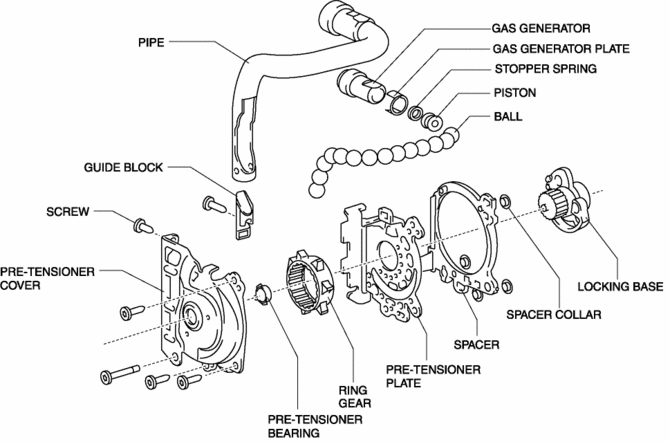
The pre-tensioner seat belt is installed to the front seat belt retractor.
-
The pre-tensioner seat belt consists of the following parts shown in the figure:
Operation
Normal operation (pre-tensioner non-operation)
-
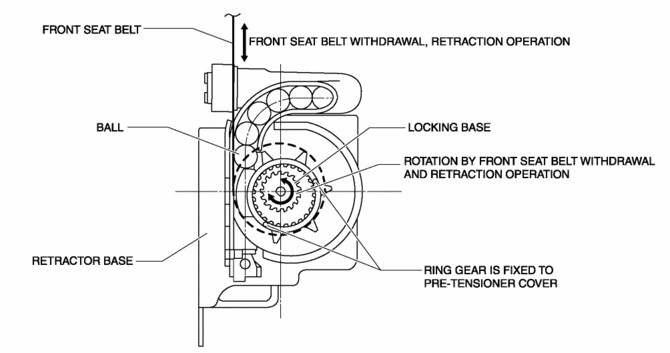
Normally, there is a gap between the locking base and the ring gear.
-
The ring gear rotates in conjunction with the withdrawal and retraction of the front seat belts, however, in the pre-tensioner part it is kept separated.
Pre-tensioner activation
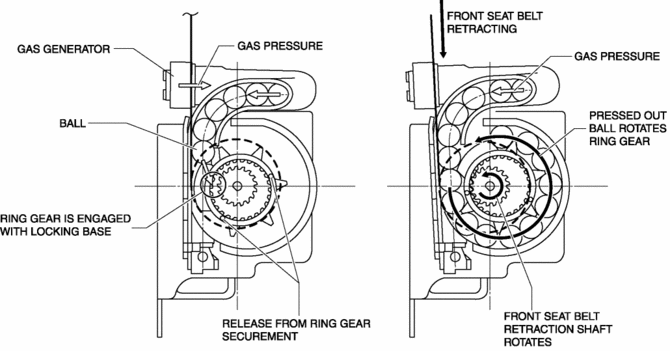
1. The gas generator produces gas when it receives an operation signal from the SAS control module.
2. The ball in the cylinder is pressed by the gas pressure and the ring gear is removed from its securement.
3. The ring gear is engaged with the locking base and the force of the ball being pressed out is transmitted to the retraction shaft.
4. The front seat belt is retracted in conjunction with the rotation of the retraction shaft.
Fail-safe
-
Function not equipped.
 Lap Pre Tensioner Seat Belt [Two Step Deployment Control System]
Purpose
The lap pre-tensioner seat belts retract and tighten the seat belt webbing
to protect the front passengers during a collision.
Function
The lap pre-tensioner seat belts ...
 Pre Tensioner Seat Belt [Two Step Deployment Control System]
Purpose
The pre-tensioner seat belt retracts and tightens the seat belt webbing to
protect the front passengers during a collision.
Function
The pre-tensioner seat belts operate ...
Other materials:
Start Stop Unit Removal/Installation
CAUTION:
If configuration is not performed when the start stop unit is replaced with
a new one, the vehicle specification information is not stored in the start
stop unit and the system will not operate normally.
When performing configuration, it is necessary to read the vehicl ...
Essential Information
Introduction
Be extremely careful and prevent injury to yourself and others or damage to your
vehicle when using this manual for inspection and maintenance.
If you are unsure about any procedure it describes, we strongly urge you to have
a reliable and qualified service shop perform the work ...
Instrument Cluster Removal/Installation
CAUTION:
If configuration is not performed when the instrument cluster is replaced
with a new one, the vehicle specification information is not stored in the instrument
cluster and the system will not operate normally.
When performing configuration, it is necessary to read the ...
