
Mazda CX-5 Service & Repair Manual: Headlight High Beam Indicator Light
Purpose
-
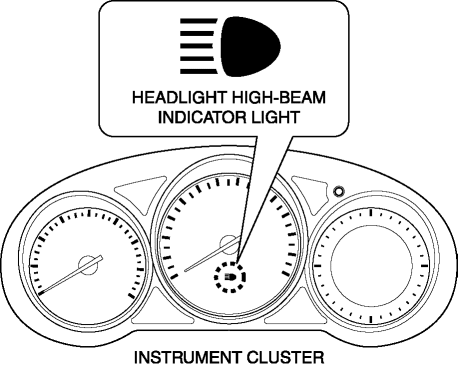
Notifies the user that the headlights (HI) are illuminated.
Function
-
Illuminates when the headlight (HI) or parking illumination conditions are met.
Construction
-
Displayed in the instrument cluster.
Operation
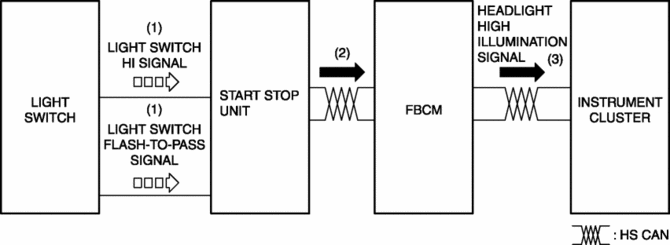
1. When the light switch is operated to the HI or parking position, a light switch HI or parking signal is input to the start stop unit.
2. The start stop unit sends the light switch HI or parking signal to the front body control module (FBCM).
3. The front body control module (FBCM) sends the light switch HI signal to the instrument cluster as a headlight HI illumination signal.
4. When the instrument cluster receives the headlight HI illumination signal, it illuminates the headlight high-beam indicator light.
Fail-safe
-
Function not equipped.
 Headlight Bulb Removal/Installation
Halogen Type
Headlight LO bulb
1. Disconnect the negative battery cable..
2. Disconnect the connector.
3. Rotate the headlight LO bulb in the direction of the arrow (1) shown in the
figure ...
 Headlight Leveling Actuator
Purpose, Function
The headlight leveling actuator drives the motor based on the target optical
axis voltage, which is input from the AFS control module, to change the optical
axis of the ...
Other materials:
Turning the Engine Off
WARNING
Do not stop the engine while the vehicle is moving:
Stopping the engine while the vehicle is moving for any reason other than in
an emergency is dangerous.
Stopping the engine while the vehicle is moving will result in reduced braking
ability due to the loss of power braking, which co ...
Turn Signal/Hazard Warning Indicator Lights
Purpose
Notifies the driver that a turn light, the hazard warning lights are flashing.
Function
Flashes according to the turn switch and hazard warning switch operations.
Construction
Displayed in the instrument cluster.
Operation
Turn system
1. When th ...
Rear Parking Brake Cable Removal/Installation
1. Remove the front console box..
2. Remove the shift lever knob. (MTX).
3. Remove the shift panel..
4. Remove the upper panel..
5. Remove the rear console..
6. Loosen the adjusting nut.
7. Remove the floor under cover No.2..
8. Remove in the order indicated in the table.
9. Install ...
