
Mazda CX-5 Service & Repair Manual: Glove Compartment Removal/Installation
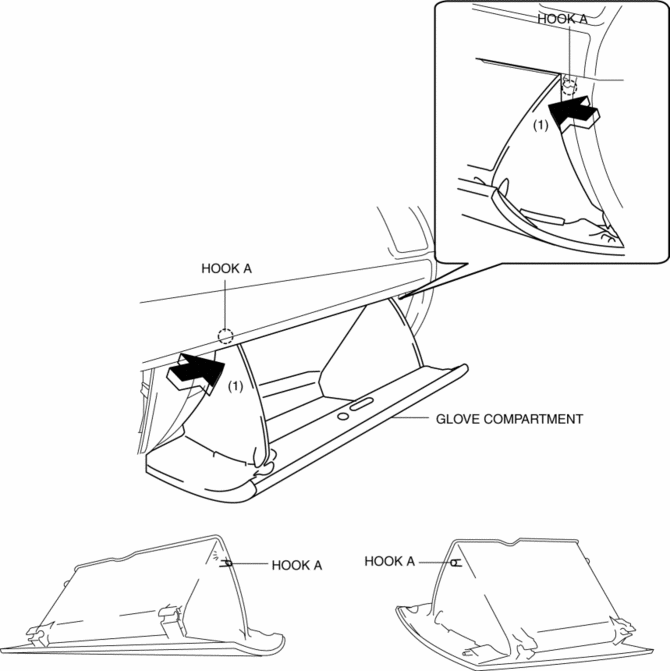
1. Push the glove compartment in the direction of the arrow (1) and remove hooks A.
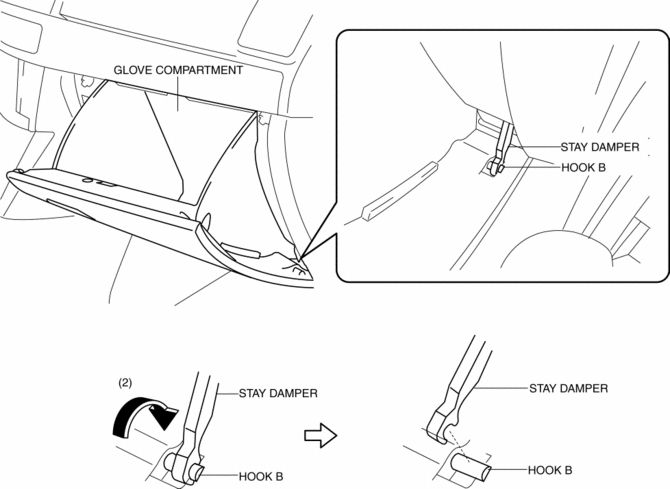
2. Pull the stay damper in the direction of the arrow (2) shown in the figure and remove the hook B.
CAUTION:
-
If the glove compartment is closed without being joined to the stay damper, the stay damper may be damaged. Verify that the stay damper is joined to the glove compartment before closing the glove compartment.
3. Pull down the glove compartment in the direction of the arrow (3).
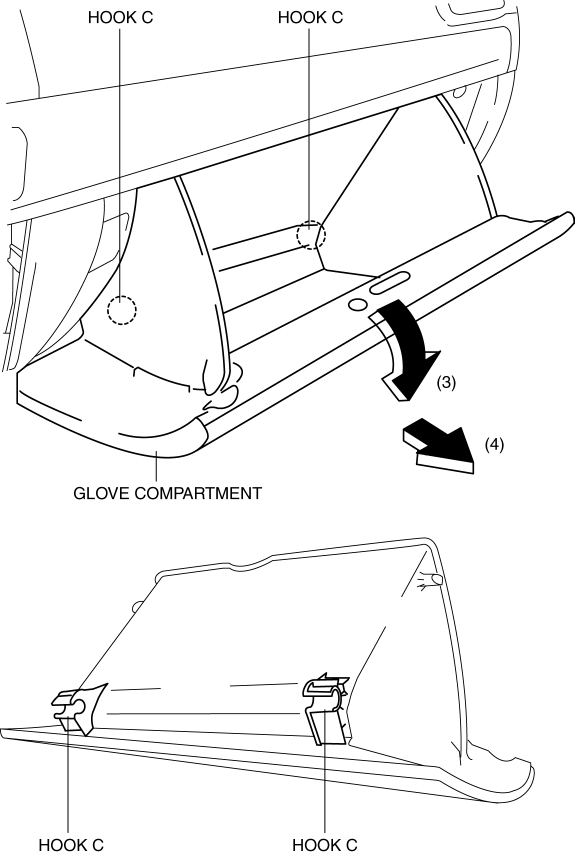
4. Pull the glove compartment in the direction of the arrow (4) and remove it while detaching hooks C.
5. Install in the reverse order of removal.
 Front Console Removal/Installation
CAUTION:
Affix protective tape to the position shown in the figure.
1. Disconnect the negative battery cable..
2. Remove the following parts:
a. Decoration panel.
b. Shift l ...
 Knee Bolster Removal/Installation
1. Disconnect the negative battery cable..
2. Remove the following parts:
a. Driver-side front scuff plate.
b. Driver-side front side trim.
c. Switch panel.
d. Decoration panel.
e. Shift l ...
Other materials:
Car Navigation System Does Not Start Operation [Car Navigation System]
Possible DTC
Even if the NAVI mode is selected, the car-navigation system screen does
not display.
POSSIBLE CAUSE
NAV switch malfunction
Power supply fuse (+B, ACC) burnt out
Open or short circui ...
Front Seat Removal/Installation
WARNING:
Handling a side air bag improperly can accidentally operate (deploy) the
air bag, which may seriously injure you. Read the service warnings/cautions
in the Workshop Manual before handling the front seat (side air bag integrated)..
If the sliding mechanisms on both side ...
Crankshaft, Main Bearing
Purpose, Function
The crankshaft converts the reciprocating movement of the piston to a rotational
movement via the connecting rod.
The main bearing forms an oil film on the outer surface of the crankshaft
journal to prevent wear due to sliding.
Construction
Crankshaft
...
