
Mazda CX-5 Service & Repair Manual: Gear Position Indicator [Fw6 A EL, Fw6 Ax EL]
Purpose/Function
-
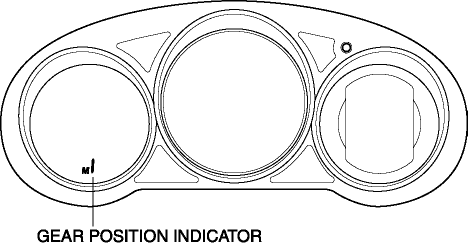
The gear position indicator illuminates while under manual shift control and displays the gear number while driving.
Construction
-
The gear position indicator is built into the instrument cluster.
Operation
-
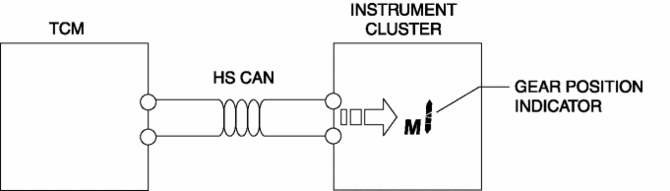
The TCM sends a gear position indicator illumination/flash request signal to the instrument cluster based on the signal from the M position switch, the up switch and the down switch via the CAN.
-
If the shift down operation is inhibited during manual shift control, the TCM flashes the gear position indicator 2 times. As a result, the driver is notified that the shift down operation has been canceled.
-
If the ATF temperature is 132 °C {270 °F} or more while in manual shift control, the TCM turns the gear position indicator off and switches to automatic shift control to reduce the transaxle load. When the ATF temperature is 122 °C {252 °F} or less for a specified time, manual shift control is enabled and the gear position indicator is re-illuminated.
 Front Fog Lights Indicator Light
Purpose
Notifies the user that the front fog lights are illuminated.
Function
Illuminates when the front fog light illumination conditions are met.
Construction
Displa ...
 Headlight High Beam Indicator Light
Purpose
Notifies the user that the headlights (HI) are illuminated.
Function
Illuminates when the headlight (HI) or parking illumination conditions are
met.
Construction
...
Other materials:
Master Warning Light
Purpose
The master warning light warns the driver that any of the following malfunctions
is occurring.
Brake switch malfunction
Engine oil solenoid valve malfunction
Automatic configuration malfunction
Function
The instrument cluster i ...
Driveline/Axle Features
Improved driveability
Bell-shaped constant velocity joint adopted for wheel-side joint
of front and rear drive shaft
Tripod-shaped constant velocity joint adopted for differential-side
joint of front drive shaft (ATX) and rear drive shaft
...
Seat Weight Sensor Calibration [Two Step Deployment Control System]
CAUTION:
If any of the following work is performed, perform the seat weight sensor
calibration using the M-MDS.
Replacement with a new seat weight sensor
Replacement with a new seat weight sensor control module
Replacement with new passenger-side seat pa ...
