
Mazda CX-5 Service & Repair Manual: Front Door Trim Removal/Installation
1. Disconnect the negative battery cable..
2. Remove the inner garnish..
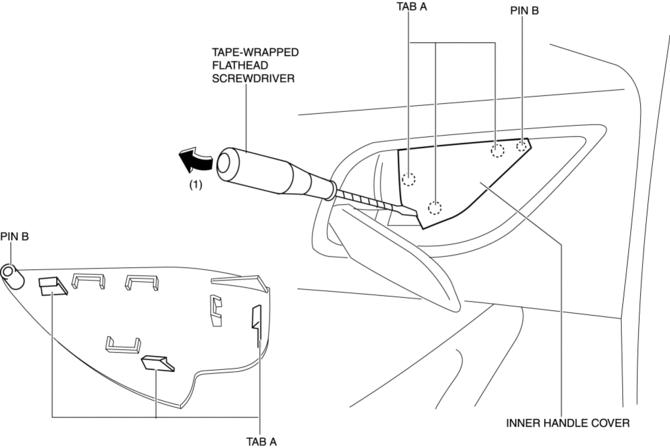
3. Insert a tape-wrapped flathead screwdriver in the position indicated by the arrow (1) in the figure and remove the inner handle cover while detach tabs A, pin B.
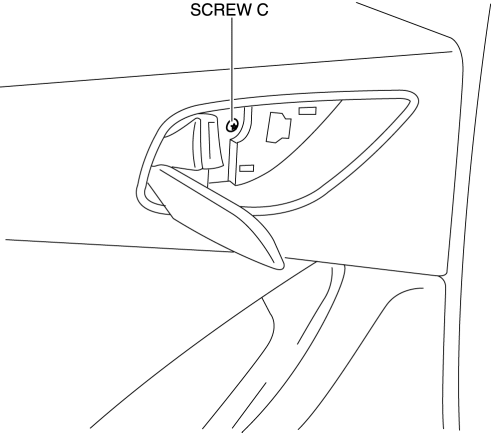
4. Remove the screw C.
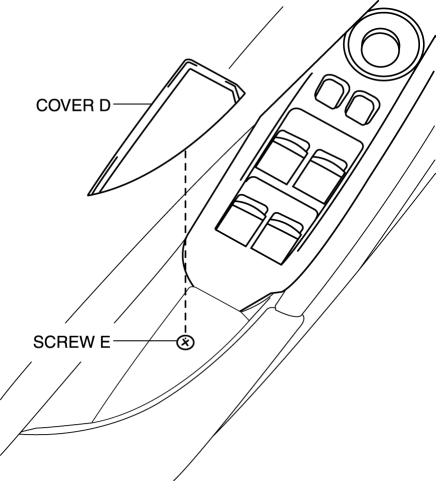
5. Remove the cover D, then remove the screw E.
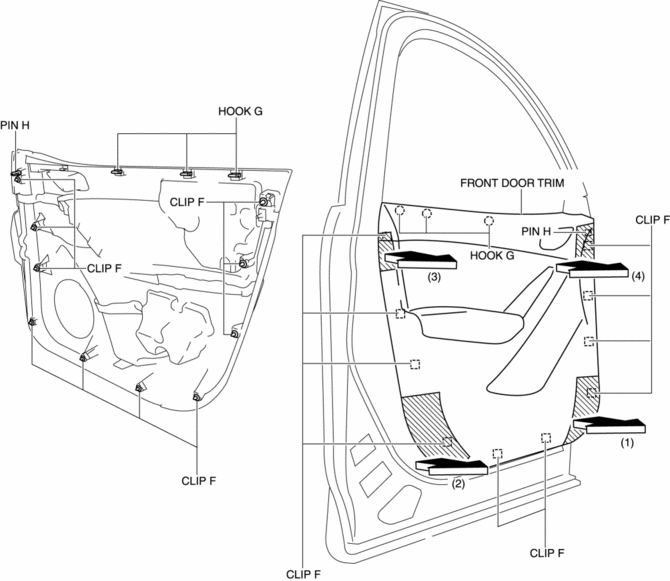
6. Take the shaded area shown in the figure, and pull the front door trim in the direction of the arrow in the order of (1), (2), (3), (4) while detaching clips F, hooks G and pin H.
CAUTION:
-
If the front door trim is removed in the same way as past vehicles by pulling it upward, it could damage clips F, hooks G and pin H. When removing the front door trim, always pull it in the direction of the arrow shown in the figure.
7. Remove the tab I in the direction of the arrow (5) shown in the figure.
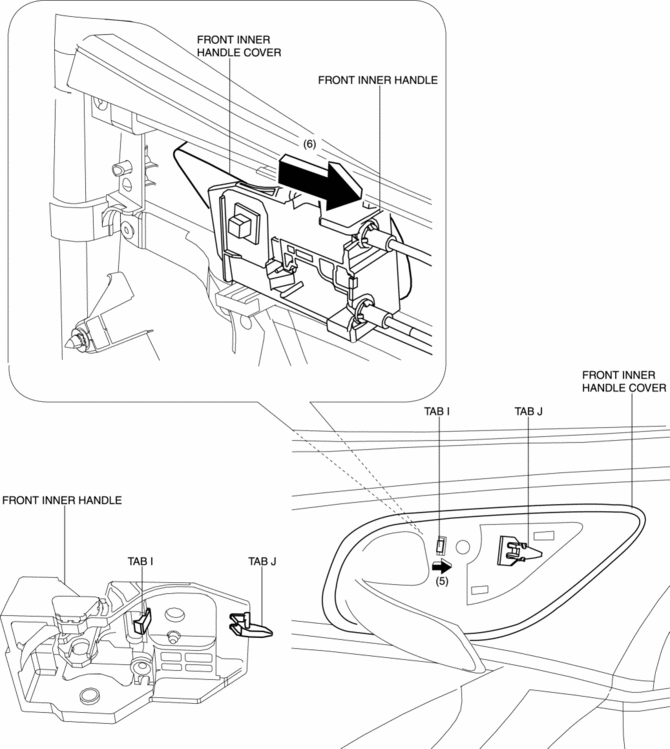
8. Remove the front inner handle in the direction of the arrow (6) shown in the figure while detaching the tab J.
9. Disconnect the power window main switch connector (driver-side) or power window subswitch connector (passenger-side).
10. Install in the reverse order of removal.
 Front Door Trim Disassembly/Assembly
Driver-side
1. Disassemble in the order shown in the figure.
1
Switch panel cover
2
Power window main switch
(See Power Window Main Switch ...
 Front Sash Molding Installation
WARNING:
Using a utility knife with bare hands can cause injury. Always wear gloves
when using a utility knife.
NOTE:
Double-sided adhesive tape has already been attached to t ...
Other materials:
Fuel Pressure Sensor Inspection
Voltage Inspection
NOTE:
The fuel pressure sensor cannot be removed as a single unit. When replacing
the fuel pressure sensor, replace it together with the fuel distributor as a
single unit.
1. Connect the M-MDS to the DLC?2.
2. Switch the ignition ON (engine off or on).
3. ...
Car Navigation System Does Not Operation [Car Navigation System]
Possible DTC
Even if the map screen is touched, the car-navigation system cannot be
operated
POSSIBLE CAUSE
Audio unit malfunction (bad LCD panel)
Car-navigation unit malfunction
Diagnosti ...
Audio Set (Type B)
CAUTION
Do not press the panel strongly or press it with a sharp-pointed object. Otherwise,
the panel could be damaged.
1 Power/Volume/Display/Sound Controls
2 Operating the Radio
3 Operating the Satellite Radio
4 Operating the Compact Disc (CD) Player
5 How to use the Auxiliary jack/U ...
