
Mazda CX-5 Service & Repair Manual: Front Door Key Cylinder Removal/Installation
1. Disconnect the negative battery cable..
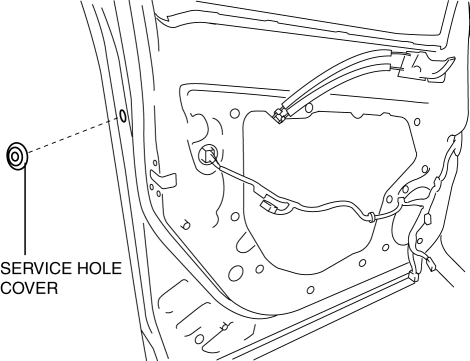
2. Remove the service hole cover.
3. Detach the screw from the front door key cylinder.
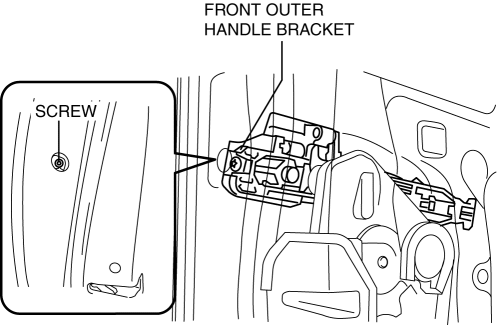
NOTE:
-
The screw cannot be removed because the front outer handle bracket has a stopper which prevents the screw from falling.
4. While pressing the outer handle bracket tab in the direction of arrow (1) shown in the figure, pull the front door key cylinder in the direction of arrow (2) to detach the outer handle bracket and the front door key cylinder.
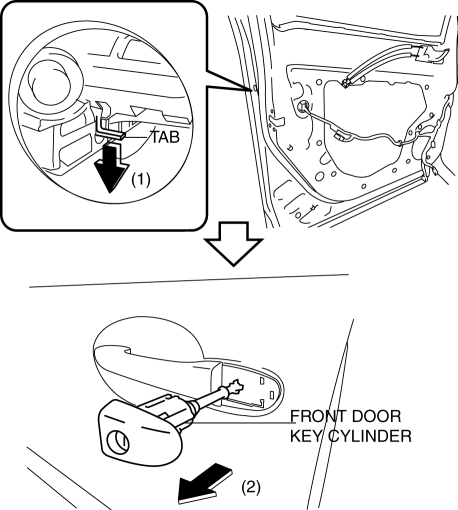
5. Remove the front door key cylinder from the outer handle bracket.
6. Insert a tape-wrapped flathead screwdriver into the position shown in the figure.
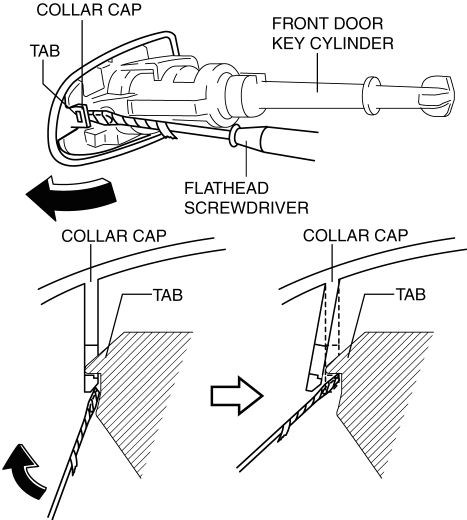
7. Move the tape-wrapped flathead screwdriver in the direction of the arrow shown in the figure to lift up the collar cap, and detach the collar cap from the front door key cylinder tab.
8. Remove the collar cap from the front door key cylinder.
9. Install in the reverse order of removal.

 Front Door Key Cylinder Switch Inspection
1. Perform the front door glass preparation..
2. Disconnect the negative battery cable..
3. Remove the following parts:
a. Inner garnish.
b. Front door trim.
c. Front door key cylinder.
d. ...
Other materials:
Crankshaft Position (CKP) Sensor
Purpose/Function
Detects the crankshaft speed as basic information for mainly determining
the fuel injection timing and ignition timing.
Detects the crankshaft speed and inputs it to the PCM as a CKP signal.
Construction
Installed on the side of the cylinder block (ri ...
Power Outer Mirror Switch Inspection
1. Disconnect the negative battery cable..
2. Remove the power outer mirror switch..
3. Verify that the continuity between the power outer mirror switch terminals
is as indicated in the table.
If not as indicated in the table, replace the power outer mirror switch..
...
Back Up Light Switch Removal/Installation [C66 M R]
1. Disconnect the negative battery cable..
2. Remove the front under cover No.2..
3. Remove in the order indicated in the table.
4. Install in the reverse order of removal.
1
Back-up light switch connector
2
Back-up light switch
...
