
Mazda CX-5 Service & Repair Manual: Assist Handle Removal/Installation
Removal
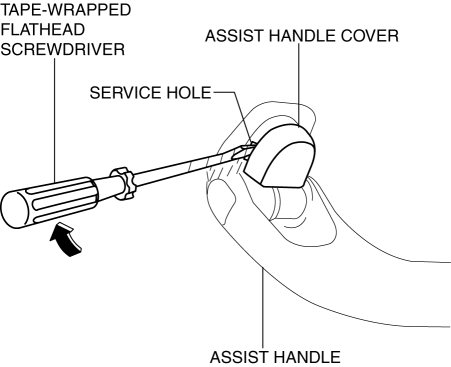
1. Insert a tape-wrapped flathead screwdriver into the service hole and remove the assist handle covers.
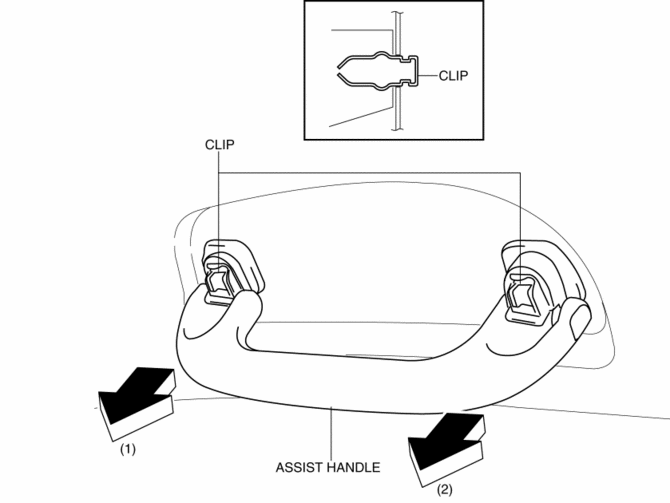
2. Remove the assist handle in the direction of the arrow (1) and (2), while detach clips.
NOTE:
-
Remove the assist handle by shaking it up and down.
Installation
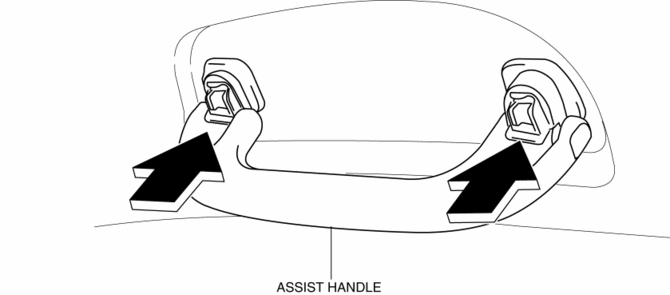
1. Push the assist handle in the direction of the arrow shown in the figure.
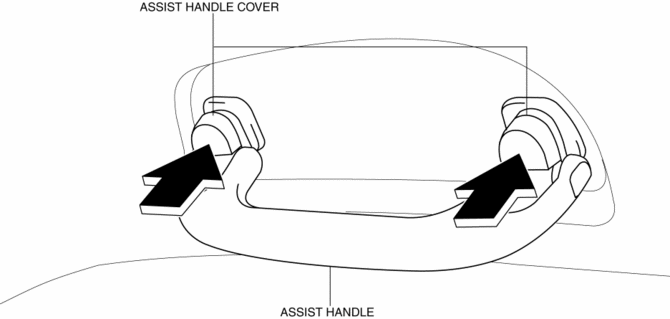
2. Push the assist handle cover assembled to install the assist handle.
 Amenities
...
 Front Console Box Removal/Installation
NOTE:
Affix protective tape to the position shown in the figure.
1. Insert a tape-wrapped flathead screwdriver in the position indicated by the
arrow in the figure and detach cl ...
Other materials:
Ventilator Grille Removal/Installation
Side Ventilator Grille
Driver-side
1. Disconnect the negative battery cable..
2. Remove the switch panel..
3. Insert your hand from the area where the switch panel was installed, remove
the side ventilator grille in the direction of the arrow shown in the figure while
detaching hooks A.
...
Buckle Switch Inspection
Driver-side
1. Switch the ignition to off.
2. Disconnect the negative battery cable and wait for 1 min or more..
3. Remove the front seat..
4. Remove the front buckle..
5. Inspect for continuity between the buckle switch terminals using a tester.
If not as indicated in the tab ...
Audio Control Switch Operation
When the audio unit is turned on, operation of the audio unit from the steering
wheel is possible.
NOTE
Because the audio unit will be turned off under the following conditions,
the switches will be inoperable.
• When the ignition is switched off.
• When the power button on the audio uni ...
