
Mazda CX-5 Service & Repair Manual: Front Brake (Disc) Removal/Installation
1. Remove in the order indicated in the table.
2. Install in the reverse order of removal.
3. After installation, add brake fluid, bleed the air, and inspect for fluid leakage..
4. Depress the brake pedal a few times, rotate the wheel by hand, and verify that the brake does not drag.
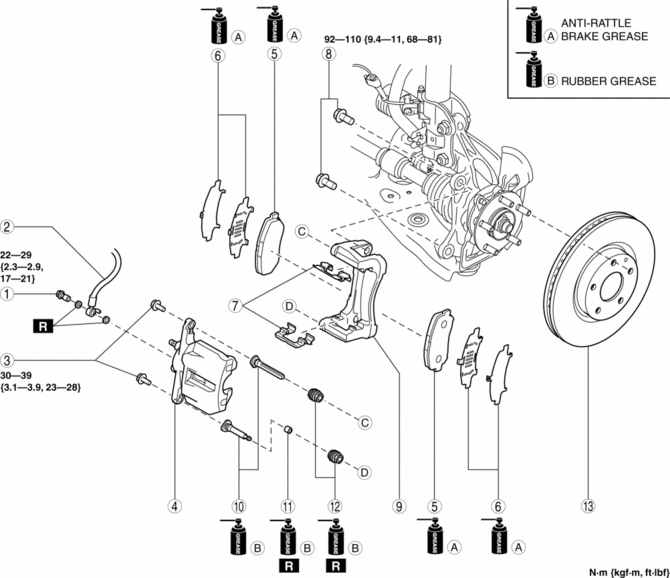
|
1 |
Bolt |
|
2 |
Brake hose |
|
3 |
Bolt |
|
4 |
Caliper (See Disc Pad Installation Note.) |
|
5 |
Disc pad (See Disc Pad Installation Note.) |
|
6 |
Shim |
|
7 |
Guide plate |
|
8 |
Bolt |
|
9 |
Mounting support |
|
10 |
Slide pin |
|
11 |
Bushing |
|
12 |
Dust boot |
|
13 |
Disc plate |
Disc Pad Installation Note
1. Clean the exposed area of the piston.
2. Push the piston in using the commercially available disc brake expand tool.
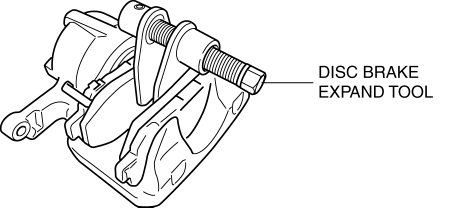
3. Install the disc pads to the mounting support.
 Front Brake (Disc) Inspection
Brake Judder Repair Hints
Description
1. Brake judder concern has the following 3 characteristics:
Steering wheel vibration
1. The steering wheel vibrates in the rotation direction. This characte ...
 Rear Brake (Disc)
Purpose/Function
Large diameter, solid-disc type front brakes with a 303 mm {11.9 in} diameter
and 10 mm {0.39 in} thickness have been adopted, improving braking force and
fade resistance ...
Other materials:
Power Window Main Switch Removal/Installation
1. Disconnect the negative battery cable..
2. Remove the cover A.
3. Insert a tape-wrapped fastener remover shown in the figure and remove the
tab B in the direction of arrow (1).
4. Slide the power window main switch cover in the direction of the arrow (2)
shown in the figure and ...
Underbody Dimensions [Dimensions]
NOTE:
The following figure is a bottom view.
Point symbol
Designation
Hole diameter or bolt or nut size mm {in}
A
Front crossmember installation hole
?24 {0.94}
B
Fro ...
Clock Spring Adjustment [Two Step Deployment Control System]
1. Set the front wheels straight ahead.
CAUTION:
The clock spring will break if over?wound. Do not forcibly turn the clock
spring.
2. Turn the clock spring clockwise until it stops.
3. Turn the clock spring counterclockwise approx. 2 turns.
4. Align the mark on the clo ...
