
Mazda CX-5 Service & Repair Manual: Front Body Straight Line Dimensions (2) [Dimensions]
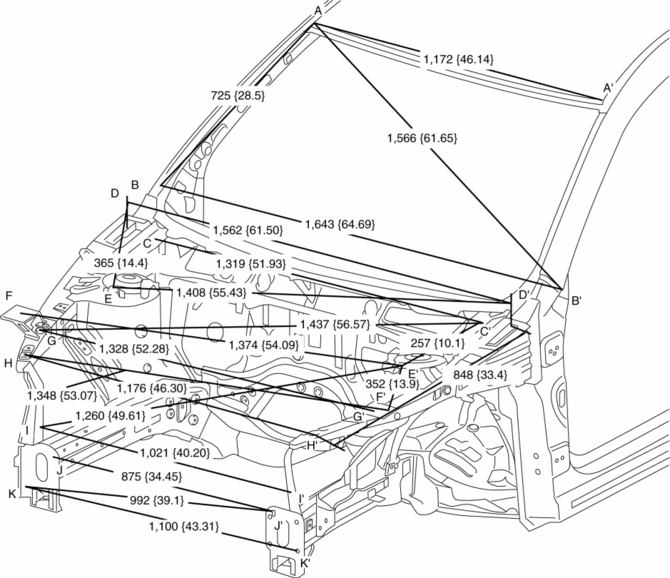
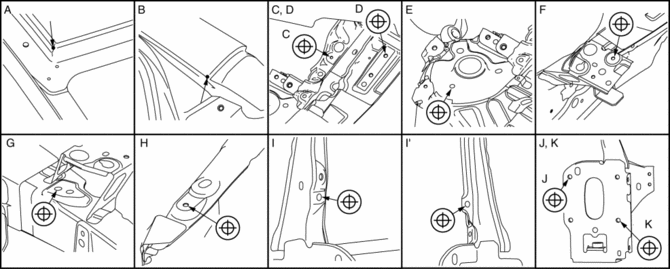
|
Point symbol |
Designation |
Hole diameter or bolt or nut size mm {in} |
|
A |
Roof seamless location |
- |
|
B |
Cabin side outer frame (front pillar outer) projection location |
- |
|
C |
Wiper bracket datum hole |
?7 {0.3} |
|
D |
Hood hinge installation hole |
?10 {0.39} |
|
E |
Front suspension upper mounting installation hole |
?10.2 {0.402} |
|
F |
Front fender panel installation hole |
?7 {0.3} |
|
G |
Apron reinforcement lower datum hole |
?10 {0.39} |
|
H |
Front fender panel installation hole |
?7 {0.3} |
|
I |
Side stay datum hole |
?10 {0.39} |
|
J |
Front bumper reinforcement installation hole |
?12 {0.47} |
|
K |
Front bumper reinforcement installation hole |
?12 {0.47} |
 Front Body Straight Line Dimensions (1) [Dimensions]
Point symbol
Designation
Hole diameter or bolt or nut size mm {in}
A
Cowl panel installation hole
?5 {0.2}
...
 Front Crossmember Removal/Installation
CAUTION:
Performing the following procedures without first removing the front ABS
wheel-speed sensor may possibly cause an open circuit in the wiring harness
if it is pulled by mistake. ...
Other materials:
Fuel Gauge Sender Unit Removal/Installation [Awd]
WARNING:
Always keep sparks and flames away from fuel when servicing the fuel system.
Fuel can be easily ignited which could cause serious injury or death, and damage
to equipment.
Fuel line spills and leakage from the pressurized fuel system are dangerous.
Fuel can ignite a ...
Fuses
Your vehicle's electrical system is protected by fuses.
If any lights, accessories, or controls do not work, inspect the appropriate
circuit protector. If a fuse has blown, the inside element will be melted.
If the same fuse blows again, avoid using that system and consult an Authorized
Ma ...
Mirror Base Installation
1. Cut away all of the original sealant using a razor.
WARNING:
Using a razor with bare hands can cause injury. Always wear gloves when using
a razor.
2. Clean and degrease the ceramic coating on the glass and the base.
CAUTION:
Keep the area free of dirt and grease, and ...
