
Mazda CX-5 Service & Repair Manual: Floor Side Panel Installation [Panel Replacement]
Symbol Mark

Installation Procedure
1. When installing new parts, measure and adjust the body as necessary to conform with standard dimensions.
2. Drill holes for the plug welding before installing the new parts.
3. After temporarily installing new parts, make sure the related parts fit properly.
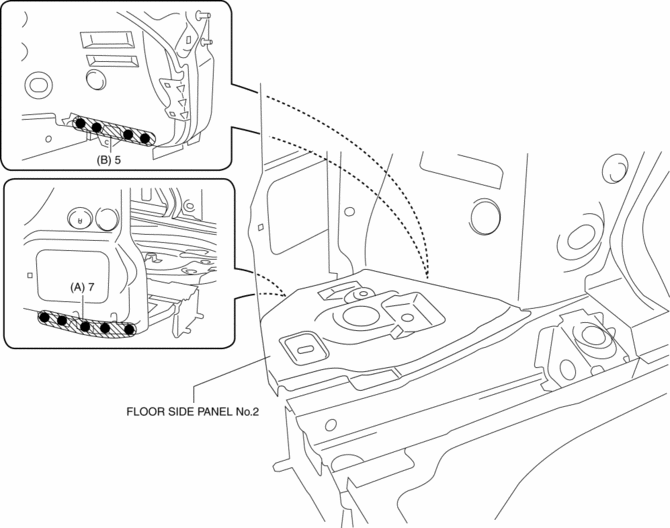
4. Spot weld the 7 locations indicated by (A) shown in the figure.
5. Spot weld the 5 locations indicated by (B) shown in the figure, then install the floor side panel No.2.
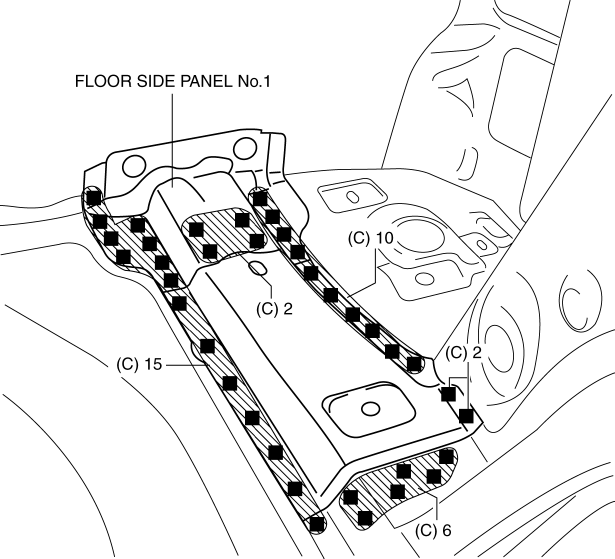
6. Plug weld the 35 locations indicated by (C) shown in the figure, then install the floor side panel No.1.
 Extractor Chamber Removal/Installation
1. Disconnect the negative battery cable..
2. Remove the following parts:
a. Rear splash shield.
b. Rear combination light.
c. Rear bumper.
3. Insert a tape-wrapped flathead screwdriver show ...
 Floor Side Panel Removal [Panel Replacement]
Symbol Mark
Removal Procedure
1. Drill the 35 locations indicated by (A) shown in the figure, then remove the
floor side panel No.1.
2. Drill the 5 locations indicated by (B) shown in th ...
Other materials:
Rear Bumper Removal/Installation
CAUTION:
Affix the protective tape to the position (body side) shown in the figure.
1. Disconnect the negative battery cable..
2. Remove the rear combination light..
3. Remove fasteners A.
4. Pull the rear over fender in the direction of the arrow shown in the figure
...
Glass Antenna
Purpose, Function
The RDS (Radio Data System) converts radio broadcast waves to electric signals
and sends the signals to the audio unit.
Construction
An antenna with excellent noise resistance has been adopted to the rear window
glass.
Fail-safe
Function n ...
Forced Ignition On
NOTE:
In order to perform a forced ignition ON, the M-MDS is necessary. If the
servicing is being done outside of an Authorized Mazda dealership, contact an
Authorized Mazda dealership for instructions.
The forced ignition ON procedure forces a power supply to each part when
...
