
Mazda CX-5 Service & Repair Manual: Expansion Valve Removal/Installation
1. Disconnect the negative battery cable..
2. Discharge the refrigerant from the system..
CAUTION:
-
If moisture or foreign material enters the refrigeration cycle, cooling ability will be lowered and abnormal noise will occur. Always immediately plug all open fittings after removing any refrigeration cycle parts to keep moisture or foreign material out of the cycle.
3. Remove the nut.
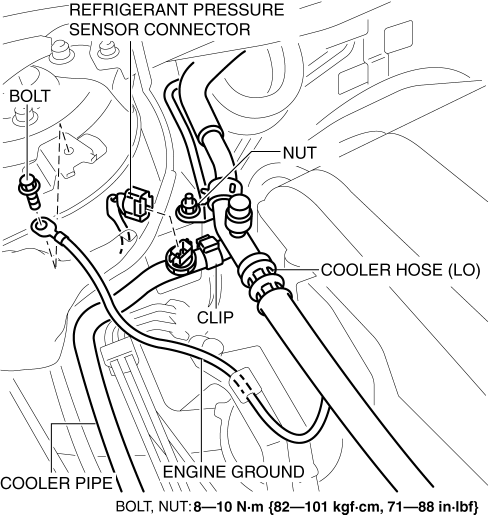
4. Remove the clip.
5. Disconnect the refrigerant pressure sensor connector.
6. Disconnect the engine ground.
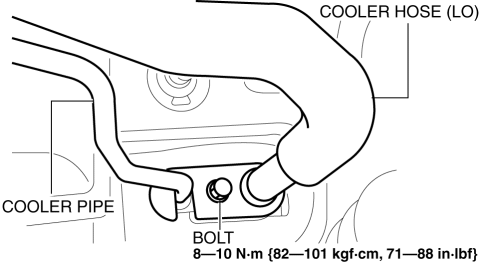
7. Remove the bolt and disconnect the cooler hose (LO) and cooler pipe. Do not allow compressor oil to spill.
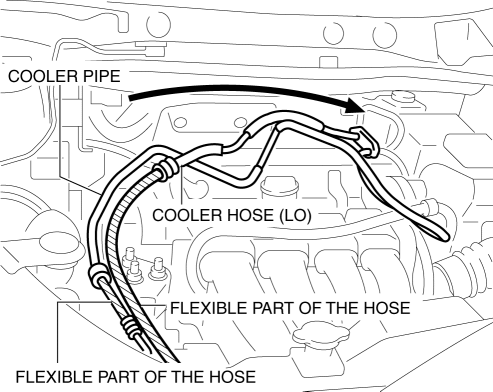
8. Set the cooler hose (LO) and cooler pipe aside as shown in the figure while being careful not to let remaining oil in the pipes to spill.
CAUTION:
-
When setting the cooler hose (LO) and cooler pipe aside, only bend the flexible part of the hose. If force is applied to areas other than the flexible hose, the pipe will bend and could be damaged.
9. Remove the bolt.
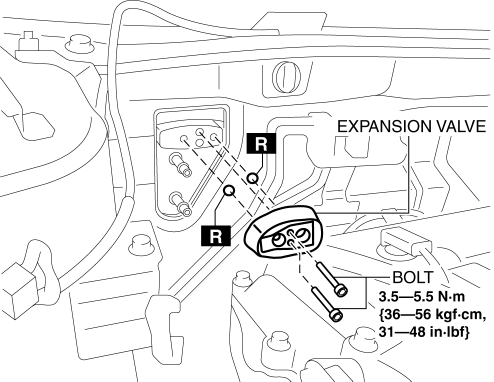
10. Remove the expansion valve. Do not allow compressor oil to spill.
11. Install in the reverse order of removal.
12. Perform the refrigerant system performance test..
 Expansion Valve
Purpose
The expansion valve atomizes liquid refrigerant to facilitate cooling of
the evaporator.
Function
The expansion valve reduces the pressure of liquid refrigerant rapidly ...
 Fan Switch Inspection [Manual Air Conditioner]
1. Disconnect the negative battery cable..
2. Remove the following parts:
a. Shift lever knob (MTX).
b. Glove compartment.
c. Front console box.
d. Shift panel.
e. Upper panel.
f. Rear c ...
Other materials:
Crankshaft Position (CKP) Sensor Inspection
Visual Inspection
CAUTION:
When foreign material such as an iron chip is on the CKP sensor, it can cause
abnormal output from the sensor because of flux turbulence and adversely affect
the engine control. Be sure there is no foreign material on the CKP sensor when
replacing.
...
Shift Pressure Control (Line Pressure Control) [Fw6 A EL, Fw6 Ax EL]
Outline
The TCM drives the pressure control solenoid and adjusts the pressure based
on the accelerator pedal depression amount, vehicle speed, ATF temperature,
and gear shift signal. As a result, line pressure is controlled finely and with
high accuracy according to the engine load c ...
Automatic Transaxle Removal/Installation [Fw6 A EL]
CAUTION:
Performing the following procedures without first removing the front ABS
wheel-speed sensor may possibly cause an open circuit in the harness if it is
pulled by mistake. Before performing the following procedures, disconnect the
front ABS wheel-speed sensor (axle side) and ...
