
Mazda CX-5 Service & Repair Manual: Cooling Fan Motor Removal/Installation
WARNING:
-
Never remove the cooling system cap or loosen the radiator drain plug while the engine is running, or when the engine and radiator are hot. Scalding engine coolant and steam may shoot out and cause serious injury. It may also damage the engine and cooling system.
-
Turn off the engine and wait until it is cool. Even then, be very careful when removing the cap. Wrap a thick cloth around it and slowly turn it counterclockwise to the first stop. Step back while the pressure escapes.
-
When you are sure all the pressure is gone, press down on the cap using the cloth, turn it, and remove it.
1. Disconnect the negative battery cable..
2. Drain the engine coolant..
3. Remove the plug hole plate..
4. Remove the air cleaner, air hose and fresh air duct component..
5. Remove the coolant reserve tank..
6. Remove in the order indicated in the table.
7. Install in the reverse order of removal.
8. Refill the engine coolant..
9. Inspect for engine coolant leakage..
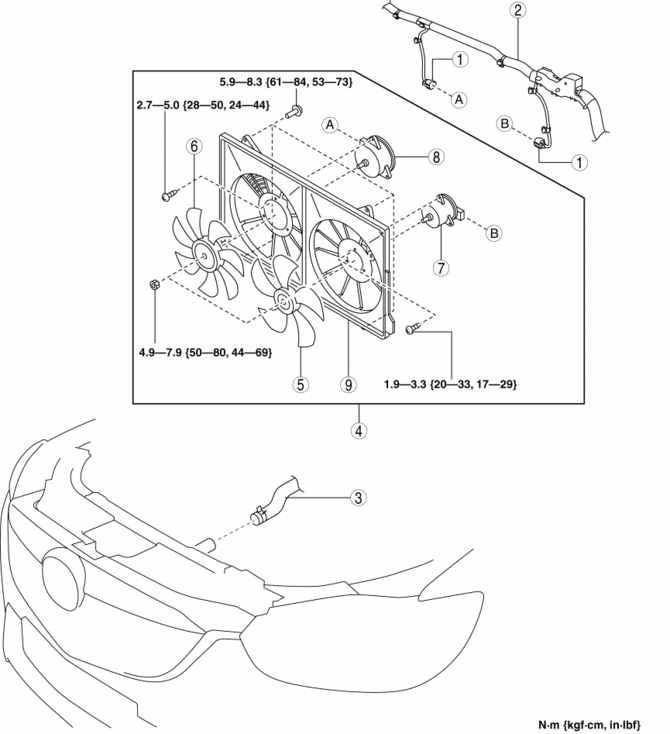
|
1 |
Cooling fan motor connector |
|
2 |
Wiring harness |
|
3 |
Upper radiator hose (See Upper radiator hose Removal Note.) |
|
4 |
Cooling fan component (See Cooling Fan Component Removal Note.) |
|
5 |
Cooling fan No.1 |
|
6 |
Cooling fan No.2 |
|
7 |
Cooling fan motor No.1 |
|
8 |
Cooling fan motor No.2 |
|
9 |
Radiator cowling |
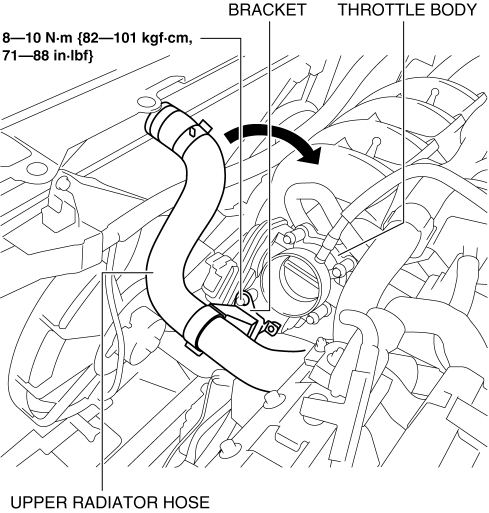
Upper radiator hose Removal Note
1. Remove the bracket shown in the figure from the throttle body and set the upper radiator hose aside.
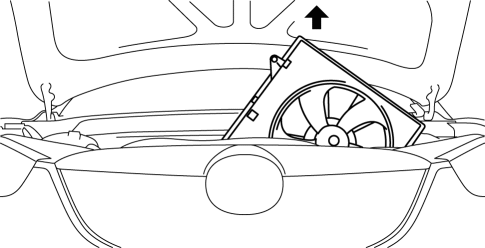
Cooling Fan Component Removal Note
1. Remove the cooling fan component from above the engine compartment.
 Cooling Fan Motor Inspection
Part Inspection
1. Verify that the battery is fully charged..
2. Disconnect the cooling fan motor connector (2 terminals).
3. Install a tester and battery to the cooling fan motor connector (2 te ...
 Cooling System Cap Inspection
WARNING:
Never remove the cooling system cap or loosen the radiator drain plug while
the engine is running, or when the engine and radiator are hot. Scalding engine
coolant and steam may ...
Other materials:
Starting System [Skyactiv G 2.0]
Outline
A coaxial reduction type starter has been adopted.
Structural View
Structure
Consists of the following parts:
Starter
(See STARTER [SKYACTIV-G 2.0].)
Starter relay
(See STARTER REL ...
Remote Handle Lever Removal/Installation
1. Disconnect the negative battery cable..
2. Remove the following parts:
a. Trunk board.
b. Trunk end trim.
c. Rear scuff plate.
d. Trunk side trim.
3. Disconnect the remote cable on the remote handle lever side from the remote
cable on the rear seat side.
4. Remove the remote c ...
Rear Washer Hose Removal/Installation
1. Disconnect the negative battery cable..
2. Remove the front over fender..
3. Remove the mudguard (RH)..
4. Disconnect the rear washer hose A from the washer motor.
5. Remove the rear washer hose A from the washer tank hook.
6. Remove the rear washer hose A from clips A and B.
7. Disco ...
