
Mazda CX-5 Service & Repair Manual: Audio Unit (Without Color LCD)
NOTE:
-
“iPod” is a registered trademark of Apple Inc. in the United States and other countries.
Outline
-
The audio unit controls the CD, radio, exterior input devices (AUX/USB/iPod) and the display.
Function
-
The display integrated into the audio unit displays audio information such as CD and radio related information.
-
Records the following items which the user has set.
|
Item |
Specification |
|
|
Preset memory |
AM |
6 |
|
FM1 |
6 |
|
|
FM2 |
6 |
|
|
SIRIUS (SAT1) |
6 |
|
|
SIRIUS (SAT2) |
6 |
|
|
SIRIUS (SAT3) |
6 |
|
USB/iPod applicable
-
A USB device such as USB memory or an iPod connected to the auxiliary jack/USB port can be controlled by the audio unit.
Latin character display
-
Information such as CD and radio related information can be displayed in the audio unit display in Latin characters.
Specification
|
Item |
Specification |
||
|
Rated voltage |
(V) |
12 |
|
|
Frequency range |
AM |
(kHz) |
530—1,710 |
|
FM |
(MHz) |
87.75—107.9 |
|
|
Amplifier maximum output |
(W) |
25?4 |
|
|
Output impedance |
(ohm) |
4 |
|
Construction
-
An audio unit with integrated AM/FM tuner/MP3/WMA (Windows Media Audio)/AAC (Advanced Audio Coding) applicable CD player is assembled to the audio panel.
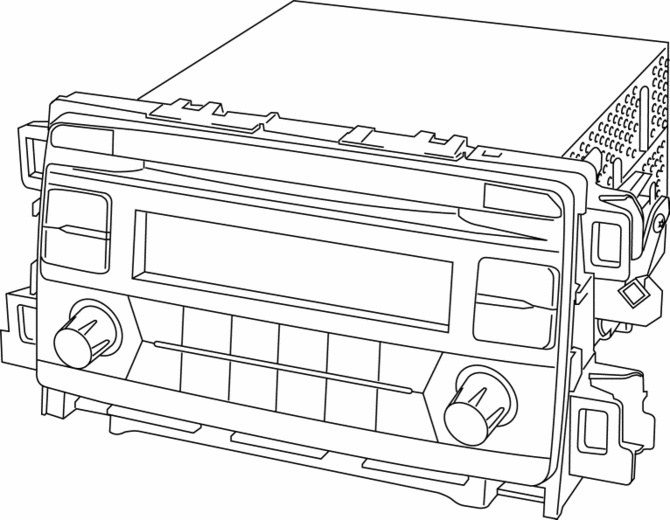
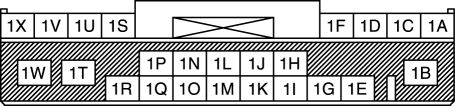
Terminal layout and signal
Audio unit
|
Terminal |
Signal |
|
|
|
1A |
Front door speaker LH (+) |
|
1B |
B+ |
|
|
1C |
Front door speaker LH (-) |
|
|
1D |
Front door speaker RH (+) |
|
|
1E |
TNS (+) |
|
|
1F |
Front door speaker RH (-) |
|
|
1G |
TNS (–) |
|
|
1H |
— |
|
|
1I |
Vehicle speed signal |
|
|
1J |
— |
|
|
1K |
— |
|
|
1L |
— |
|
|
1M |
— |
|
|
1N |
Steering switch 1 |
|
|
1O |
— |
|
|
1P |
Steering switch 2 |
|
|
1Q |
— |
|
|
1R |
ACC |
|
|
1S |
Rear door speaker LH (+) |
|
|
1T |
— |
|
|
1U |
Rear door speaker LH (-) |
|
|
1V |
Rear door speaker RH (+) |
|
|
1W |
Power ground |
|
|
1X |
Rear door speaker RH (-) |
|
|
|
2A |
— |
|
2B |
— |
|
|
2C |
— |
|
|
2D |
— |
|
|
2E |
— |
|
|
2F |
— |
|
|
2G |
— |
|
|
2H |
— |
|
|
2I |
— |
|
|
2J |
— |
|
|
2L |
— |
|
|
2N |
— |
|
|
2P |
— |
|
|
2R |
— |
|
|
2T |
— |
|
|
2V |
— |
|
|
2W |
AUX control |
|
|
2X |
AUX LH, RH (-) |
|
|
2Y |
AUX signal RH (+) |
|
|
2Z |
AUX signal LH (+) |
|
|
2AA |
— |
|
|
2AB |
— |
|
|
2AC |
— |
|
|
2AD |
— |
|
|
|
3A |
USB power ground |
|
3B |
USB data (+) |
|
|
3C |
USB power supply |
|
|
3D |
USB data (-) |
|
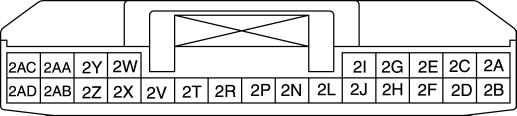

Antenna feeder connector
|
Terminal |
Signal |
|
|
|
4A |
ANT CONT |
|
4B |
Antenna |
|

Switch Location
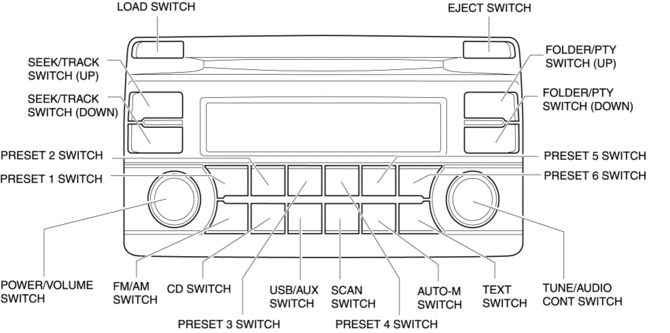
Operation
-
Refer to AUDIO SYSTEM.
Fail-safe
-
Function not equipped.
 Audio Unit (With Color LCD)
NOTE:
“iPod” is a registered trademark of Apple Inc. in the United States and other
countries.
Purpose
The audio unit controls the CD, radio, exterior input devices (AUX/US ...
 Audio Unit Personalization Features Setting Procedure
Door Locks Systems
1. Switch the ignition ON (engine off or on).
2. Turn the audio unit power on.
3. Select the following from the audio unit screen.
a. “Setup”
b. “Vehicle”
c. “D ...
Other materials:
Pre Tensioner Seat Belt [Standard Deployment Control System]
Purpose
The pre-tensioner seat belt retracts and tightens the seat belt webbing to
protect the front passengers during a collision.
Function
The pre-tensioner seat belts operate (deploy) based on the operation signal
from the SAS control module to instantly retract and tigh ...
Fuel Distributor
Purpose, Function
Distributes fuel pumped from the high pressure fuel pump to each fuel injector.
Construction
The fuel distributor is installed to the cylinder head.
The fuel distributor is integrated with the fuel pressure sensor.
...
Heater Core
Purpose
The heater core heats passing air.
Function
A portion of the engine coolant is taken into the heater core to heat the
air passing through the heater core.
Construction
The heater core consists of a tube which passes engine coolant, and the heat
ra ...
