
Mazda CX-5 Service & Repair Manual: Audio Pilot®2 Microphone Removal/Installation
NOTE:
-
AudioPilot®2 is a registered trademark of Bose® Corporation.
1. Disconnect the negative battery cable..
2. Remove the following parts:
a. Driver-side front scuff plate.
b. Driver-side front side trim.
c. Switch panel.
d. Decoration panel.
e. Shift lever knob (MTX).
f. Front console box.
g. Shift panel.
h. Upper panel.
i. Rear console.
j. Side wall.
k. Front console.
l. Hood release lever.
m. Driver-side lower panel.
3. Disconnect the connector.
4. Remove the nut.
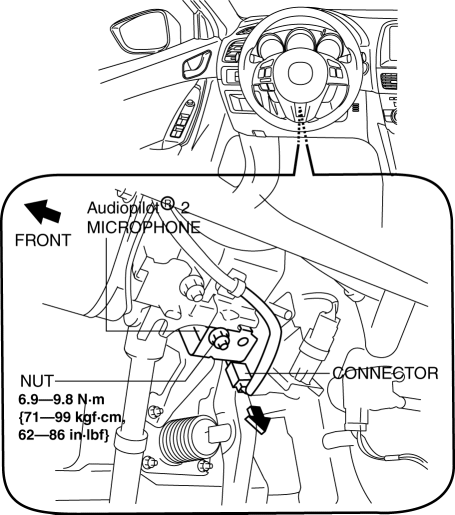
5. Remove the AudioPilot®2 microphone.
6. Install in the reverse order of removal.
 Audio Amplifier Removal/Installation
1. Disconnect the negative battery cable..
2. Remove the following parts:
a. Front scuff plate (RH).
b. Front side trim (RH).
3. Remove the bolts.
4. Lift up the audio amplifier in the d ...
 Audio System
NOTE:
“iPod” is a registered trademark of Apple Inc. in the United States and other
countries.
Outline
An audio unit compatible with AM/FM tuner and MP3/WMA (Windows Media ...
Other materials:
Quarter Window Glass Removal
1. Disconnect the negative battery cable..
2. Remove the following parts:
a. Trunk board.
b. Trunk end trim.
c. Rear scuff plate.
d. Trunk side trim.
e. D-pillar trim.
f. C-pillar trim.
3. Apply protective tape along the edge of the body and the quarter window glass.
WARNING: ...
Door Module Panel
Purpose, Function
Styrofoam door module panels have been adopted for reducing vehicle weight.
Construction
Styrofoam is applied to the door module panels (shaded areas) during manufacture.
...
Air Fuel Ratio (A/F) Sensor
Purpose/Function
Detects the oxygen concentration (all-range air/fuel ratio) in the exhaust
gas as basic information for mainly determining the fuel injection amount.
Detects the oxygen concentration (all-range air/fuel ratio) in the exhaust
gas and inputs it to the PCM as an ox ...
