
Mazda CX-5 Service & Repair Manual: Air Bag System Warning Light [Two Step Deployment Control System]
Purpose
-
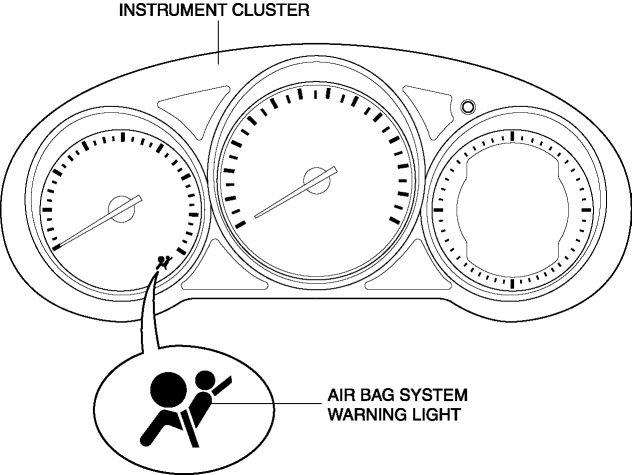
The air bag system warning light notifies the driver of a malfunction in the SRS air bag system.
Function
-
If a malfunction occurs in the SRS air bag system, the air bag system warning light illuminates or flashes.
Construction
-
LEDs (light-emitting diode) have been adopted for the air bag system warning light.
-
The air bag system warning light is built into the instrument cluster.
Operation
-
When the ignition is switched ON, the instrument cluster illuminates the air bag system warning light for a specified period to indicate that the SRS air bag system is performing initialization diagnostics. If there is no malfunction in the SRS air bag system, the indicator light turns off.
-
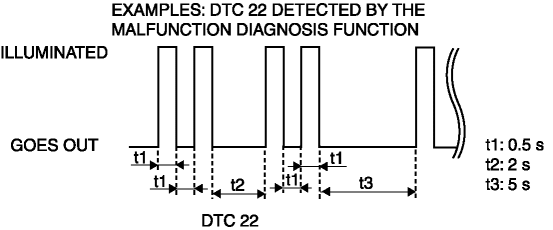
If the SAS control module detects a malfunction in the SRS air bag system, it sends a warning signal to the instrument cluster via CAN communication. The instrument cluster illuminates or flashes the air bag system warning light based on the warning signal it receives to display the DTC.
-
If there is a malfunction in the SRS air bag system, the air bag system warning light displays DTCs according to the following patterns:
-
If there are several malfunctions in the SRS air bag system, the DTC of the highest priority ranking is displayed first.
Fail-safe
-
Function not equipped.
 Air Bag System Warning Light [Standard Deployment Control System]
Purpose
The air bag system warning light notifies the driver of a malfunction in
the SRS air bag system.
Function
If a malfunction occurs in the SRS air bag system, the air bag ...
 Air Bag System [Standard Deployment Control System]
Outline
The air bag system is a device that supplements the passenger restraint function
of the seat belts. The air bag system will not have the designed effect if the
seat belts are not ...
Other materials:
Center Accessory Socket Removal/Installation
1. Disconnect the negative battery cable..
2. Remove the upper console..
3. Insert a tape-wrapped flathead screwdriver into the gap between the cap tab
and socket.
4. Move the flathead screwdriver in the direction of the arrow (1) shown in the
figure, press the center accessory socket ...
Starter Disassembly/Assembly [Skyactiv G 2.0]
1. Disassemble in the order indicated in the table.
2. Assemble in the reverse order of disassembly.
1
Magnetic switch
2
Adjustment washer
3
Rear housing
4
Brush and brush holder
...
Side Air Bag Sensor Removal/Installation [Two Step Deployment Control System]
WARNING:
Handling the side air bag sensor improperly can accidentally operate (deploy)
the air bag module, which may seriously injure you. Read the air bag system
service warnings and cautions before handling the side air bag sensor..
1. Switch the ignition to off.
2. Disconnec ...
