
Mazda CX-5 Service & Repair Manual: Air Bag System Warning Alarm [Standard Deployment Control System]
Purpose
-
The air bag system warning alarm notifies the driver that a malfunction occurred in the air bag system instead of the air bag system warning light.
Function
-
If a malfunction occurs in the air bag system while the air bag system warning light cannot illuminate, the air bag system warning alarm sounds.
Construction
-
The air bag system warning alarm sounds a buzzer in the instrument cluster.
Operation
-
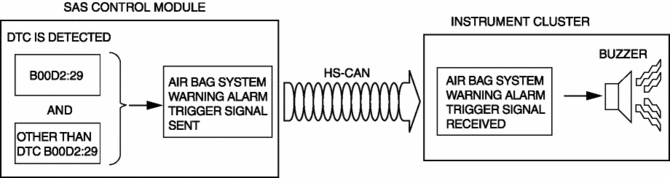
The SAS control module sends the air bag system warning alarm trigger signal to the instrument cluster via CAN communication to sound the buzzer in the instrument cluster.
-
If all of the following conditions are met, the SAS control module sends the air bag system warning alarm trigger signal to the instrument cluster.
-
SAS control module detects DTC B00D2:29 (air bag system warning light (during communication related malfunction))
-
SAS control module detects DTCs other than DTC B00D2:29 (Except for air bag system warning light does not illuminate DTC)
-
Refer to the air bag system warning alarm for the air bag system warning alarm sound interval.
Fail-safe
-
Function not equipped.
 Air Bag System Service Warnings [Two Step Deployment Control System]
Air Bag Module Inspection
Inspecting an air bag module using a tester can operate (deploy) the air
bag module, which may cause serious injury. Do not use a tester to inspect an
air bag mo ...
 Air Bag System Warning Alarm [Two Step Deployment Control System]
Purpose
The air bag system warning alarm notifies the driver that a malfunction occurred
in the air bag system instead of the air bag system warning light.
Function
If a malfunc ...
Other materials:
Precaution [Dynamic Stability Control (DSC)]
1. The ABS warning light and/or brake system warning light and/or TCS/DSC indicator
light and/or TCS OFF indicator light illuminate even when the system is normal.
Warning lights/Indicator lights that may illuminate and/or flash
Cases in which the light may ill ...
Shift Point Control (Automatic Shift Control) [Fw6 A EL, Fw6 Ax EL]
Outline
The TCM implements auto shift control according to the vehicle speed and
accelerator pedal depression amount while in D position.
When the vehicle is stopped with the selector lever is in the D position
and the brake pedal depressed, the neutral idle control is performed ...
Cylinder Head Gasket
Purpose, Function
The cylinder head gasket is installed between the cylinder head and cylinder
block to prevent leakage of air-fuel mixture, combustion gas, engine oil, and
engine coolant.
Construction
A four-layer type metal gasket has been adopted for the cylinder head ga ...
