
Mazda CX-5 Service & Repair Manual: Turn Signal/Hazard Warning Indicator Lights
Purpose
-
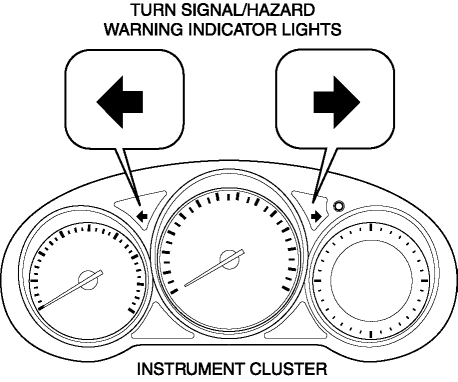
Notifies the driver that a turn light, the hazard warning lights are flashing.
Function
-
Flashes according to the turn switch and hazard warning switch operations.
Construction
-
Displayed in the instrument cluster.
Operation
Turn system
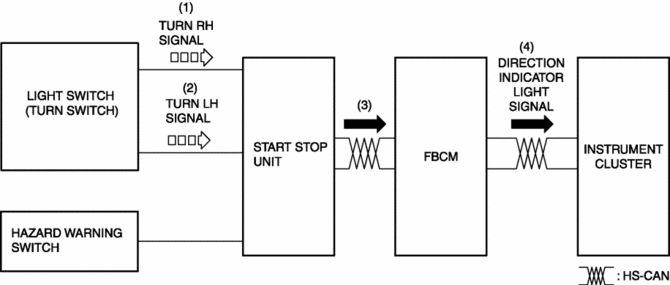
1. When the turn switch is operated to the RH position, a turn RH signal is input to the start stop unit.
2. When the turn switch is operated to the LH position, a turn LH signal is input to the start stop unit.
3. The start stop unit sends the turn RH or LH signal to the front body control module (FBCM).
4. The front body control module (FBCM) sends the turn RH or LH signal to the instrument cluster as a direction indicator light signal.
5. When a direction indicator light signal is received, the instrument cluster flashes the direction indicator light.
Hazard system
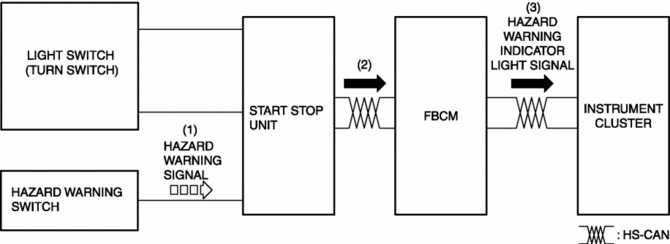
1. When the hazard switch is turned on, a hazard signal is input to the start stop unit.
2. The start stop unit sends a hazard signal to the front body control module (FBCM).
3. The front body control module (FBCM) sends the hazard signal to the instrument cluster as a hazard warning flashing signal.
4. When the hazard warning flash signal is received, the instrument cluster flashes the hazard warning lights.
Fail-safe
-
Function not equipped.
 Turn And Hazard Indicator Alarm
Purpose
The turn and hazard indicator alarm notifies the driver that a turn light
or the hazard warning lights are flashing.
Function
When the instrument cluster receives the tu ...
 Trailer
...
Other materials:
Blind Spot Monitoring (Bsm) Off Indicator Light
Purpose
The BSM OFF indicator light informs the driver that the Blind Spot Monitoring
(BSM) system is turned off or there is a malfunction in the system.
Function
The instrument cluster illuminates the BSM OFF indicator light based on the
BSM system off signal sent via a CA ...
Auto Light Sensor
Purpose
The auto light sensor detects the illumination level above and in front of
the vehicle and outputs it to the front body control module (FBCM).
Function
The auto-light sensor uses the upward illumination level sensor to detect
the illumination level above the vehicle ...
Front Body Control Module (Fbcm) Removal/Installation
CAUTION:
If configuration is not performed when the front body control module (FBCM)
is replaced with a new one, the vehicle specification information is not stored
in the front body control module (FBCM) and the system will not operate normally.
When performing configuration, ...
