
Mazda CX-5 Service & Repair Manual: Bumper Bracket Removal [Panel Replacement]
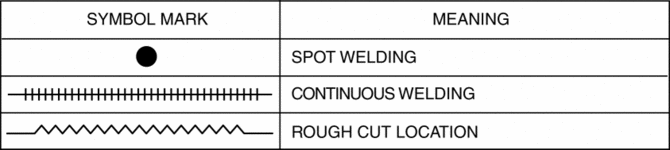
Symbol Mark
Removal Procedure
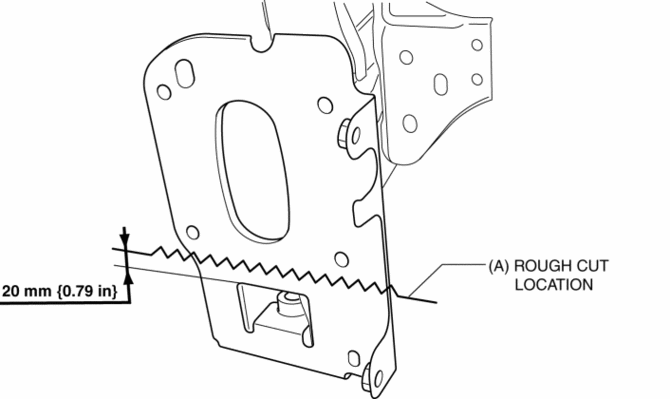
1. Rough cut area locations indicated by (A).
2. Grind the 6 locations indicated by (B) shown in the figure.
CAUTION:
-
When grinding 6 locations indicated by (B) shown in the figure and the front side frame is damaged, there is a possibility that attachment of a bracket may become difficulty. When grinding 6 locations indicated by (B) shown in the figure, the amount removed will affect the quality of the installation.
3. Grind the 2 locations indicated by (C) shown in the figure.
4. Drill the 2 locations indicated by (D) shown in the figure, then remove the half portion above the bumper bracket.
5. Drill the 3 locations indicated by (E) shown in the figure.
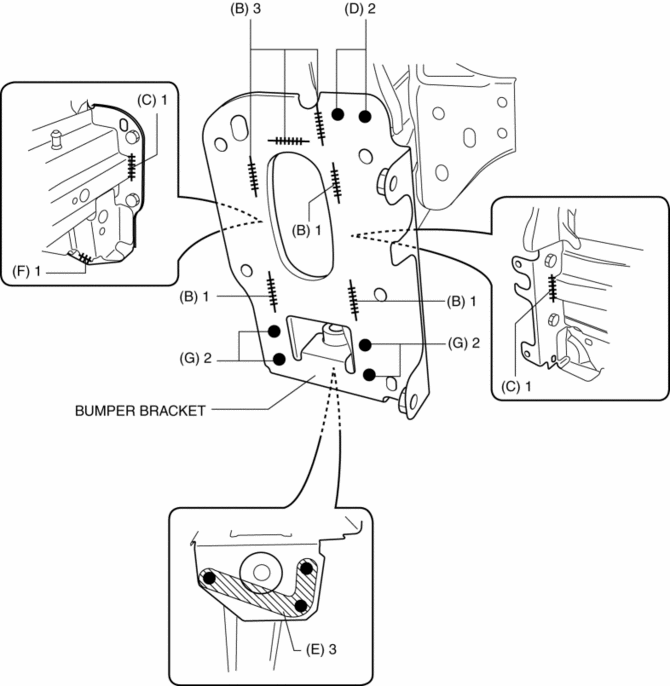
6. Grind the 1 location indicated by (F) shown in the figure.
7. Drill the 4 locations indicated by (G) shown in the figure.
8. Remove the half portion below the bumper bracket.
 Bumper Bracket Installation [Panel Replacement]
Symbol Mark
Installation Procedure
1. When installing new parts, measure and adjust the body as necessary to conform
with standard dimensions.
2. Drill holes for the plug welding 6 locations ...
 Bumper Slider Removal/Installation
Front Bumper Slider
1. Disconnect the negative battery cable..
2. Remove the seal board upper..
3. Remove the front bumper..
4. Remove bolts A.
5. Pull the front bumper slider in the dire ...
Other materials:
Intake Air Temperature (Iat) Sensor
IAT Sensor No.1
Purpose/Function
Detects the IAT before it passes through the throttle body as basic information
for mainly determining the fuel injection amount.
Detects the IAT before it passes through the throttle body and inputs it
to the PCM as an IAT signal.
Constru ...
Awd Control Module
Purpose, Function
The AWD CM calculates the optimal amount of torque distribution for the rear
wheels and outputs a corresponding electric current to the electronic control
coupling (AWD solenoid). This calculation is based on the accelerator pedal
angle, four-wheel speed, engine spe ...
Hill Launch Assist (Hla)
Purpose/Function
The hill launch assist (HLA) is a function which assists the driver in accelerating
the vehicle on a slope by activating the traction control solenoid valve in
the DSC HU/CM when the vehicle begins accelerating on a slope, and maintaining/reducing
brake fluid pressur ...
