
Mazda CX-5 Service & Repair Manual: Rear Sash Molding Installation
WARNING:
-
Using a utility knife with bare hands can cause injury. Always wear gloves when using a utility knife.
NOTE:
-
Double-sided adhesive tape has already been attached to the new rear sash molding.
1. When installing a new rear sash molding, follow the procedure below:
a. Carefully remove the adhesive remaining on the body using a razor blade.
b. Remove any grease or dirt from the adhesion surface of the body.
2. Remove the adhesive remaining on the rear sash molding and the body using a razor blade.
a. Remove any grease or dirt from the adhesion surface of the rear sash molding and the body.
b. Apply primer to the bonding area of the rear sash molding.
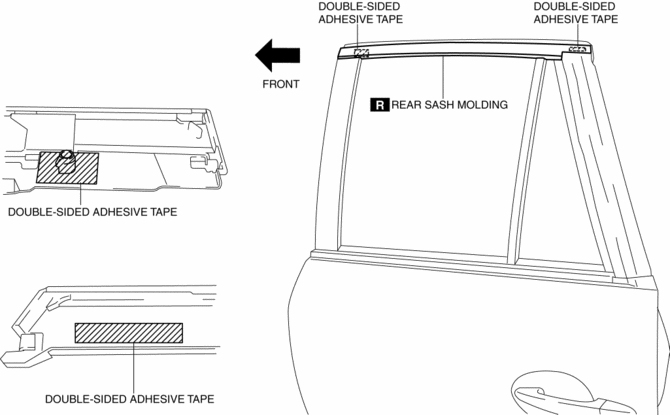
c. Affix double-sided adhesive tape to the rear sash molding as shown in the figure.
NOTE:
-
As for the double-sided adhesive tape, use 3M GT7120 or equivalent.
3. Peel off the backing of the double-sided adhesive tape.
4. Hook tab A to the body in the position where clip B aligns with the sash holes.
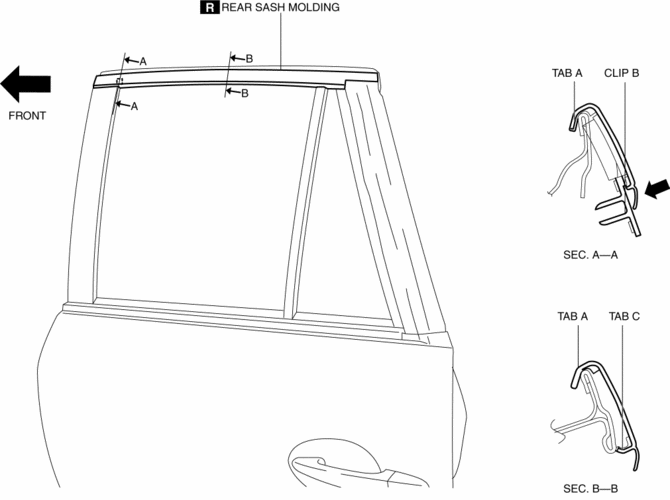
5. Press the rear sash molding in the direction of the arrow and install clip B to the body.
CAUTION:
-
Do not press the rear sash molding in any place other than the rubber areas.
6. Press the rear sash molding from the vehicle front in the direction of the arrow and install tab C.
NOTE:
-
After installing the rear sash molding, verify that tabs A and C are connected properly to the body.
 Rear Over Fender Removal/Installation
1. Remove fasteners A.
2. Pull the rear over fender in the direction of the arrow while removing clips
B.
3. Install in the reverse order of removal. ...
 Rear Sash Molding Removal
WARNING:
Using a utility knife with bare hands can cause injury. Always wear gloves
when using a utility knife.
1. Remove the rear door garnish. (rear side).
2. Remove the double-si ...
Other materials:
Air Fuel Ratio (A/F) Sensor Inspection
A/F Sensor Inspection
1. Connect the M-MDS to the DLC?2.
2. Switch the ignition ON (engine on).
3. Warm up the engine to normal operating temperature.
4. Access the following PIDs using the M-MDS..
VSS (Vehicle speed)
RPM (Engine speed)
O2S11 (A/F sensor output current ...
ABS Wheel Speed Sensor And ABS Sensor Rotor
Purpose/Function
The ABS wheel-speed sensor and ABS sensor rotor detect the rotation condition
of each wheel and transmit this information to the DSC HU/CM.
The signal from the ABS wheel-speed sensor is the primary signal that the
DSC HU/CM uses when carrying out control.
...
Oil Shower Pipe
Outline
Mechanical resistance loss has been reduced through structural changes to
achieve optimum fuel economy. An oil shower pipe has been adopted as a part
of this structural change.
Purpose, Function
The oil shower pipe injects engine oil to lubricate the contact points ...
