
Mazda CX-5 Owners Manual: Traction Control System (TCS)
The Traction Control System (TCS) enhances traction and safety by controlling engine torque and braking.
When the TCS detects driving wheel slippage, it lowers engine torque and operates the brakes to prevent loss of traction.
This means that on a slick surface, the engine adjusts automatically to provide optimum power to the drive wheels, limiting wheel spin and loss of traction.
A system malfunction or operation conditions are indicated by a warning.
Refer to Warning/Indicator Lights on .
WARNING
Do not rely on the traction control system as a substitute for safe driving:
The traction control system (TCS) cannot compensate for unsafe and reckless driving, excessive speed, tailgating (following another vehicle too closely), and hydroplaning (reduced tire friction and road contact because of water on the road surface). You can still have an accident.
Use snow tires or tire chains and drive at reduced speeds when roads are covered with ice and/or snow:
Driving without proper traction devices on snow and/or ice-covered roads is dangerous. The traction control system (TCS) alone cannot provide adequate traction and you could still have an accident.
NOTE
To turn off the TCS, press the TCS OFF switch .
TCS OFF Switch
Press the TCS OFF switch to turn off the TCS. The TCS OFF indicator light in the instrument cluster will illuminate.
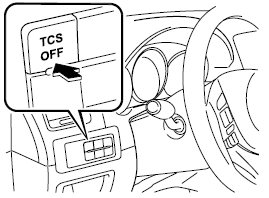
Press the switch again to turn the TCS back on. The TCS OFF indicator light will turn off.
NOTE
• When TCS is on and you attempt to free the vehicle when it is stuck, or drive it out of freshly fallen snow, the TCS will activate.
Depressing the accelerator will not increase engine power and freeing the vehicle may be difficult. When this happens, turn off the TCS.
• If the TCS is off when the engine is turned off, it automatically activates when the ignition is switched ON.
• Leaving the TCS on will provide the best traction.
• If the TCS OFF switch is pressed and held for 10 seconds or more, the TCS OFF switch malfunction detection function operates and the TCS system activates automatically. The TCS OFF indicator light turns off while the TCS system is operative.
 Antilock Brake System (ABS)
The ABS control unit continuously monitors the speed of each wheel. If one wheel
is about to lock up, the ABS responds by automatically releasing and reapplying
that wheel's brake.
The driver ...
 Dynamic Stability Control (DSC)
The Dynamic Stability Control (DSC) automatically controls braking and engine
torque in conjunction with systems such as ABS and TCS to help control side slip
when driving on slippery surfaces, or ...
Other materials:
Tcs Off Switch Inspection
1. Remove the TCS OFF switch..
2. Verify that the resistance between the TCS OFF switch terminals B and C is
as indicated in the table.
If not as indicated in the table, replace the TCS OFF switch.
TCS OFF switch specification
Terminal
Test con ...
Panel Light
Purpose
The panel light adjusts the instrument cluster and steering switch illumination
brightness.
Function
The instrument cluster adjusts the brightness of the following illumination
lights when a TNS illumination signal sent via CAN transmission from the front
body co ...
R 3 5 Brake [Fw6 A EL, Fw6 Ax EL]
Purpose/Function
The R-3-5 brake operates in 3GR, 5GR and in reverse to lock the reduction
internal gear against rotation.
Construction
The R-3-5 brake consists of the following parts shown in the figure.
The driven plate of the R-3-5 brake does not rotate be ...
