
Mazda CX-5 Service & Repair Manual: Throttle Body
Purpose, Function
-
Opens/closes the throttle valve to adjust the amount of air supplied to the cylinder.
-
Opens/closes the throttle valve according to the control signal from the PCM.
Construction
-
The throttle body is installed to the intake manifold.
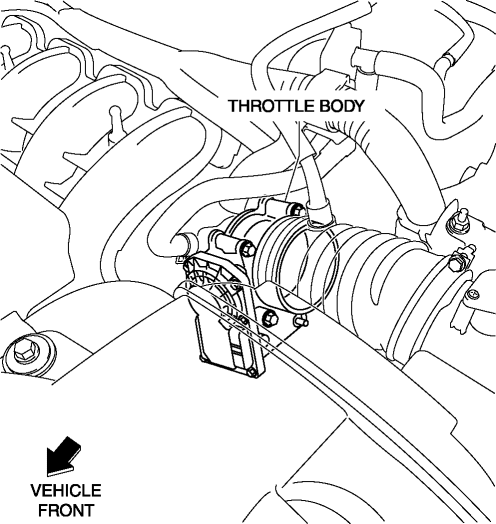
-
The throttle body consists of a throttle valve, throttle valve actuator, TP sensor, and return spring.
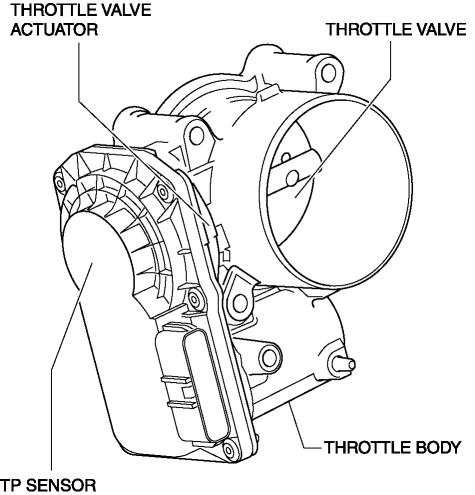
-
For the throttle position sensor, refer to CONTROL SYSTEM..
Operation
-
The throttle valve actuator opens/closes the throttle valve according to the control signal from the PCM. If there is a malfunction in the throttle valve actuator, the throttle valve is closed by the return spring in the throttle body.
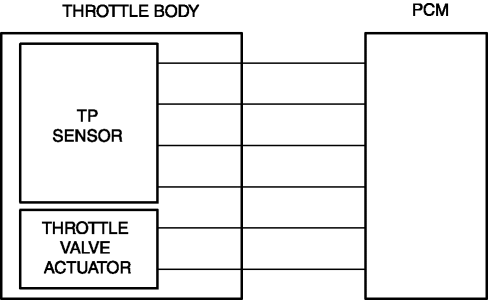
-
For the drive-by-wire control, refer to CONTROL SYSTEM..
Fail-safe
|
DTC |
Fail-safe |
|
P2101:00 |
|
|
P2107:00 |
|
|
P2110:00 |
|
|
P2112:00 |
|
|
P2119:00 |
|
 Throttle Body Inspection
Resistance Inspection
1. Disconnect the negative battery cable..
2. Disconnect the throttle body connector.
3. Measure the resistance between throttle body terminals E and F.
Throttle bo ...
 Throttle Position (TP) Sensor Inspection
Voltage Inspection
CAUTION:
The inspection cannot be performed with this method correctly if there is
a malfunction of the APP sensor or throttle valve actuator. Verify that no DTCs
rel ...
Other materials:
A/C Unit
Outline
The A/C unit which integrates the cooling and heater units has been adopted.
Construction
The A/C unit consists of the following parts.
Operation
Air Mix Door Operation
The air mix door, installed in the A/C unit, controls HOT or COLD position,
depend ...
Oil Seal (Differential) Replacement [C66 M R]
1. Remove the front under cover No.2..
2. Drain the manual transaxle oil..
3. Disconnect the drive shaft (LH) from the MTX..
4. Disconnect the drive shaft (RH) from the MTX..
5. Remove the oil seal (LH).
6. Remove the oil seal (RH).
7. Using the SSTs and a hammer, tap a new oil s ...
Hydraulic Variable Valve Timing Actuator
Purpose, Function
The hydraulic variable valve timing actuator operates according to the hydraulic
pressure and changes the phases of the exhaust camshaft. As a result, the open/close
period of the exhaust valve is changed, optimized valve timing in accordance
with driving conditions ...
